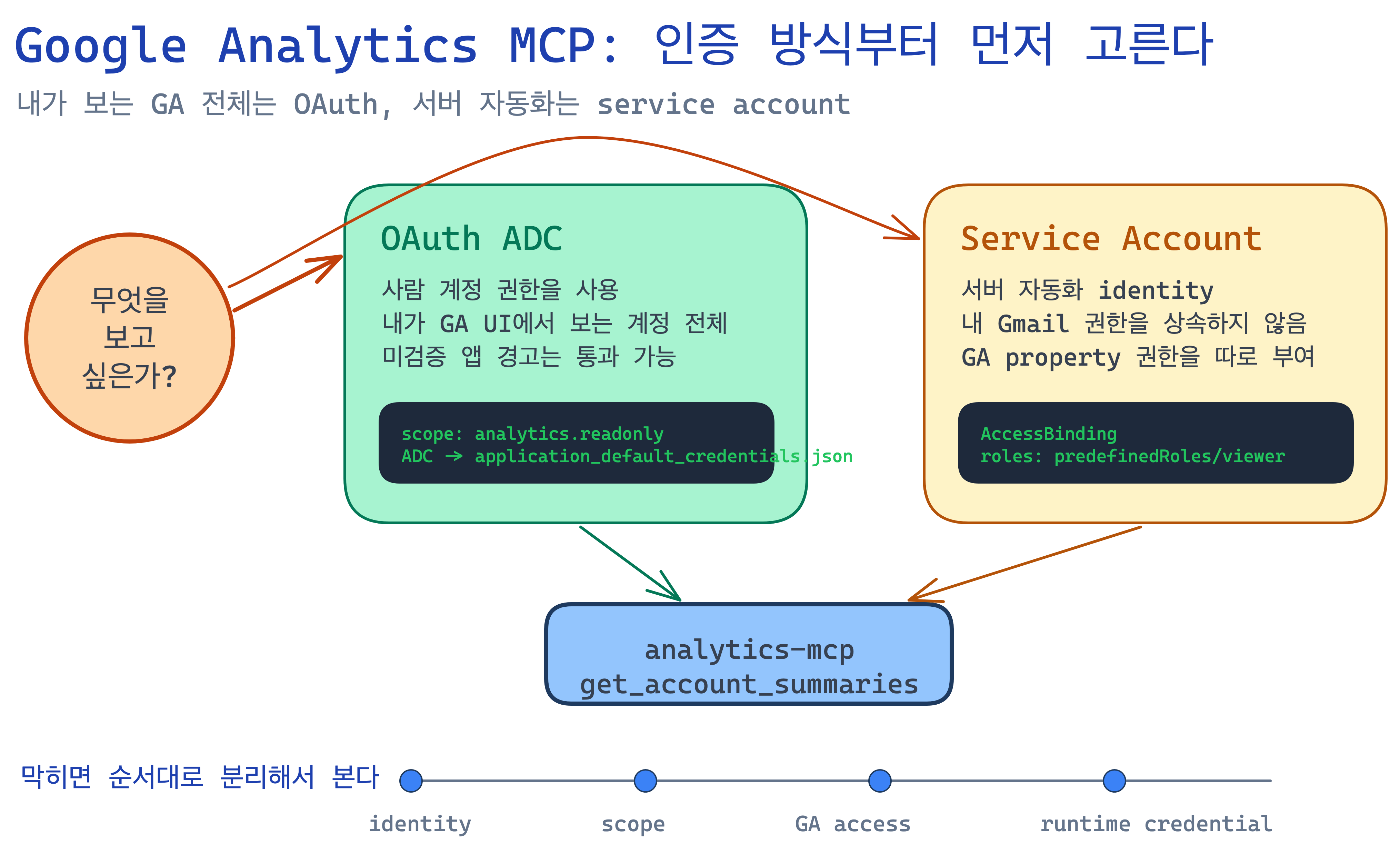
Attaching Google Analytics MCP took longer than I expected. Installing the MCP server itself was not the hard part. The real confusion came after that: which credential should I use, why did the browser block the OAuth app, why did adding a service account to GA4 fail, and which setup actually fits the goal of seeing every GA property my own account can access?
In an earlier note, Why I Replaced Growth OS GA Fetch Cron Jobs with a Self-Healing Cache, I broke Google access into three gates:
- can this identity mint a token?
- does it have permission to read the GA4 property?
- does the runtime actually receive the credential?
The MCP setup turned out to be the same kind of problem. The difference was that this was a local development tool, not a production server, and OAuth was a better fit than a service account.
Summary
- Problem: The Google Analytics MCP server started correctly, but reading real GA account lists surfaced a rotating mix of scope, OAuth consent, and service-account access problems.
- Decision: I had to stop treating this as one generic "Google auth" problem and separate OAuth ADC from service-account access.
- Result: Because the goal was to inspect all GA properties accessible to my own account, OAuth ADC was the right final setup.
- Lesson: Service accounts fit server-side automation. OAuth fits local tools that should reuse the access already granted to a human Google account.
At First It Looked Like an MCP Installation Issue
The original goal was simple: attach Google Analytics MCP to Codex and query the GA properties my account can access.
The official-looking config shape was roughly this:
[mcp_servers.analytics-mcp]
command = "pipx"
args = ["run", "analytics-mcp"]

[mcp_servers.analytics-mcp.env]
GOOGLE_APPLICATION_CREDENTIALS = "/path/to/credentials.json"
GOOGLE_PROJECT_ID = "your-google-cloud-project-id"
pipx run analytics-mcp started fine. The MCP protocol responded. The tools were there:
get_account_summaries
get_property_details
run_report
run_realtime_report
run_funnel_report
run_conversions_report
At that point it looked finished. Then get_account_summaries failed with:
ACCESS_TOKEN_SCOPE_INSUFFICIENTThat error was the first important fork. It did not mean the credential file was missing. It meant some ADC credential existed already, but it had not been issued with the scope needed to read Google Analytics.
Having ADC Was Not Enough
My local machine already had an application_default_credentials.json, so my first reaction was, "I am already signed into Google, why is this failing?"
But ADC is not just "a file exists." The result depends on which OAuth client issued it and which scopes were requested.
Google Analytics MCP expects the Analytics read-only scope, so ADC has to be issued with that scope explicitly:
gcloud auth application-default login \
  --scopes=https://www.googleapis.com/auth/analytics.readonly,https://www.googleapis.com/auth/cloud-platform \
  --client-id-file=/path/to/oauth-client.json
If I tried that without --client-id-file, using the default Cloud SDK OAuth client, the browser could block the request for a sensitive scope. In my case it surfaced as:
This app is blocked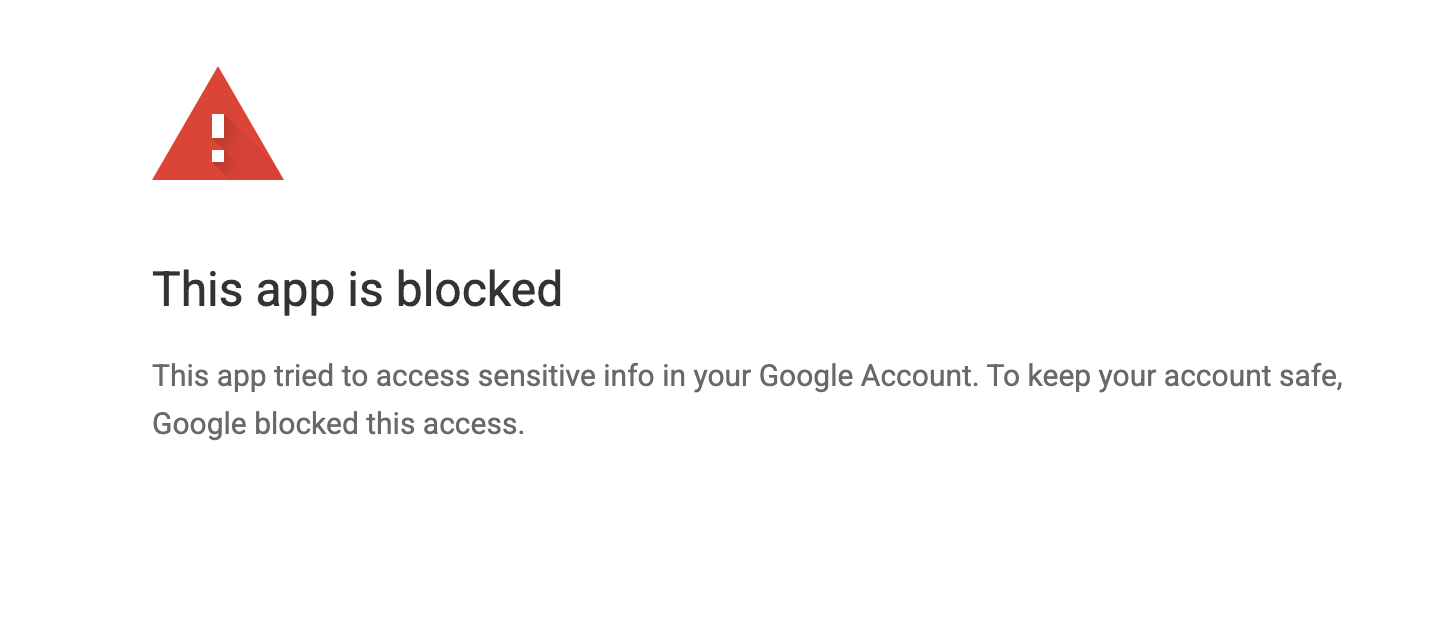
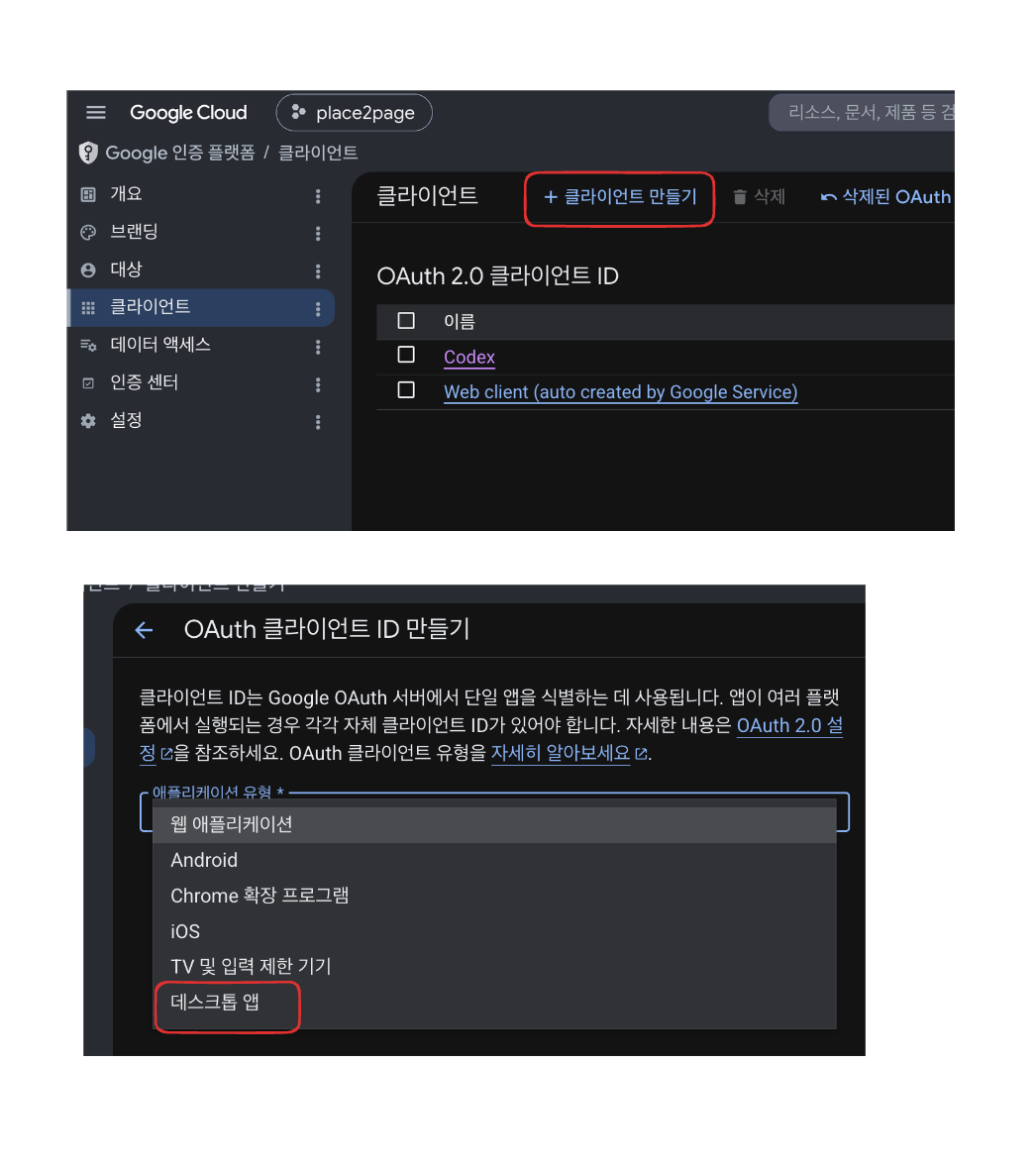
That led to the next change: create a dedicated Desktop OAuth client and pass its JSON to --client-id-file.
The Desktop OAuth client is created in Google Auth Platform's Clients screen. The important detail is to choose Desktop app, not a web application.
The OAuth Consent Screen Also Looked Like Failure at First
After creating a Desktop OAuth client and trying again, I saw a different message:
Google hasn't verified this appAt first glance that looks like another failure. It is not necessarily blocked. If the app is your own and the current Google account is registered as a test user on the OAuth consent app, you can continue through Advanced.
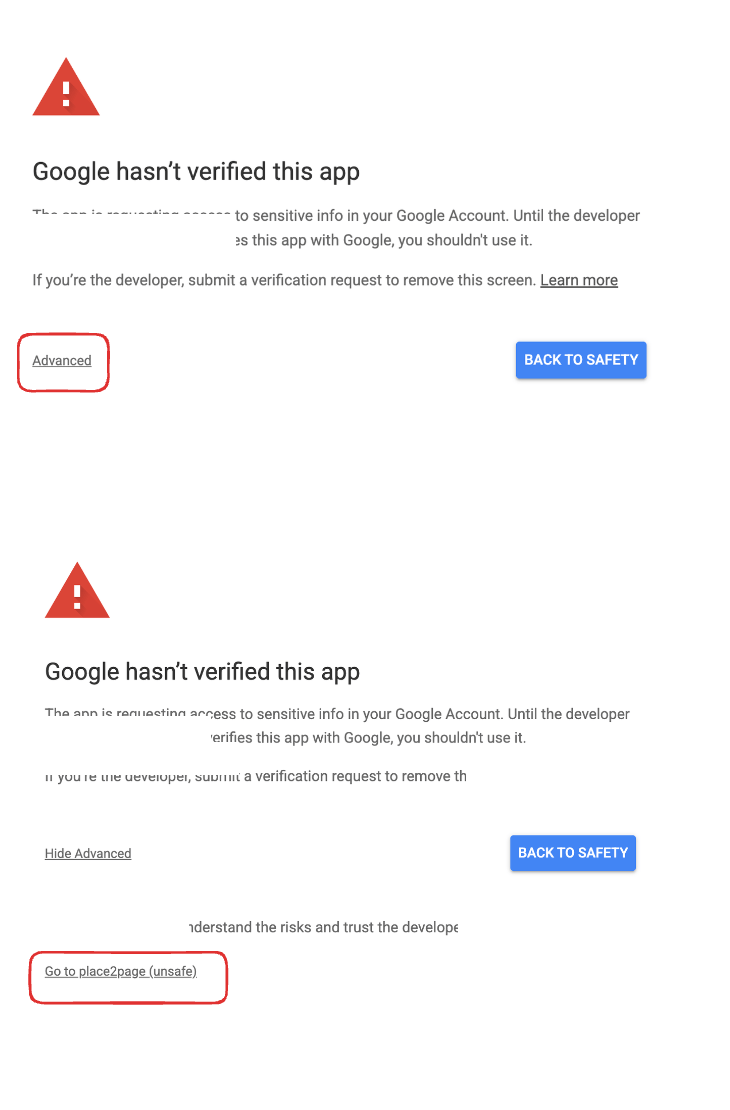
By contrast, this message is a real block:
Access blocked: app has not completed the Google verification processThat usually means the currently logged-in Google account is not listed as a test user, or the OAuth consent app configuration is not accessible to that account yet.
The three OAuth checks that ended up mattering were:
- Is the OAuth client a
Desktop appclient? - Is the current Google account listed as a test user on the OAuth consent app?
- Was ADC reissued with the
analytics.readonlyscope?
If those three line up, MCP can use the same account-level access you already have in GA.
The Service-Account Path Was a Different Problem
I also tried a service-account path in the middle of this. For production servers and scheduled jobs, that approach is often cleaner. No person needs to approve a browser flow every time, and the runtime just consumes a key file.
But the purpose here was different. I wanted MCP to show all GA properties my own Google account can access. A service account does not inherit my personal account's rights. It is a separate identity.
If you do want the service-account route, the shape looks like this:
PROJECT_ID="your-google-cloud-project-id"
SA_NAME="analytics-mcp"
KEY_PATH="$HOME/Downloads/analytics-mcp-service-account.json"

gcloud config set project "$PROJECT_ID"

gcloud services enable \
  analyticsadmin.googleapis.com \
  analyticsdata.googleapis.com \
  --project="$PROJECT_ID"

gcloud iam service-accounts create "$SA_NAME" \
  --project="$PROJECT_ID" \
  --display-name="Google Analytics MCP"

SA_EMAIL="$SA_NAME@$PROJECT_ID.iam.gserviceaccount.com"

gcloud iam service-accounts keys create "$KEY_PATH" \
  --iam-account="$SA_EMAIL" \
  --project="$PROJECT_ID"
Then that service-account email also needs GA4 access, such as Viewer or Analyst.
That introduced another trap. The GA4 UI's Add users flow sometimes expects a normal Google account email. When I tried a service-account address there, I could get an error like:
This email does not match a Google account.That does not mean the service-account key is wrong. It means the GA4 UI path and the service-account identity do not line up cleanly for that operation. In that case, the GA Admin API may be required:
GA4_PROPERTY_ID="your-ga4-property-id"
SA_EMAIL="analytics-mcp@your-google-cloud-project-id.iam.gserviceaccount.com"
ACCESS_TOKEN="$(gcloud auth print-access-token)"

curl -sS -X POST \
  "https://analyticsadmin.googleapis.com/v1alpha/properties/${GA4_PROPERTY_ID}/accessBindings" \
  -H "Authorization: Bearer ${ACCESS_TOKEN}" \
  -H "Content-Type: application/json" \
  -d "{
    \"user\": \"${SA_EMAIL}\",
    \"roles\": [\"predefinedRoles/viewer\"]
  }"
That path requires an administrator-level identity plus the analytics.manage.users scope.
How I Now Choose Between OAuth and Service Accounts
The biggest lesson here was that neither method is "better" in the abstract. They solve different problems.
OAuth uses a human account. If I want MCP to see the same accounts and properties I can see in the GA UI, OAuth is the right fit. But then OAuth consent, test-user setup, scope selection, and ADC refresh all matter.
A service account uses an operations identity. If I am building a server cache, cron job, or back-office metric collector that should run without a human approving a browser dialog, the service-account model fits better. But then access has to be granted explicitly to that identity on each GA property or account.
The decision rule I ended up with is:
- exploring all GA properties I can personally access from local MCP: OAuth ADC
- server-side repeated metric collection for one product: service account
- shared numbers for several people: server cache plus service account
- one person asking questions with their own access rights: OAuth
Without that separation, everything blurs into "Google credentials" and debugging gets longer than it should.
The Final Setup Flow That Worked
For my case, the final solution was OAuth ADC.
First, enable the Analytics APIs on the Google Cloud project:
gcloud services enable \
  analyticsadmin.googleapis.com \
  analyticsdata.googleapis.com \
  --project="your-google-cloud-project-id"
Next, create a Desktop OAuth client in Google Auth Platform. If the OAuth consent app is still in testing, make sure the Google account you will use is listed as a test user.
Then reissue ADC using the downloaded OAuth client JSON:
gcloud auth application-default login \
  --scopes=https://www.googleapis.com/auth/analytics.readonly,https://www.googleapis.com/auth/cloud-platform \
  --client-id-file=/path/to/oauth-client.json
On success, this file is updated:
~/.config/gcloud/application_default_credentials.jsonThen point MCP at that ADC file:
[mcp_servers.analytics-mcp]
command = "pipx"
args = ["run", "analytics-mcp"]

[mcp_servers.analytics-mcp.env]
GOOGLE_APPLICATION_CREDENTIALS = "/Users/you/.config/gcloud/application_default_credentials.json"
GOOGLE_PROJECT_ID = "your-google-cloud-project-id"
GOOGLE_CLOUD_PROJECT = "your-google-cloud-project-id"
The last check is the only one that matters:
get_account_summariesIf account and property lists show up, the setup is working. If the result is an empty array, the most likely causes are that the wrong Google account completed the OAuth flow or that the account has no GA access. If the failure is still scope-related, ADC needs to be reissued with the correct scope.
Next Time
When wiring up the Google Analytics API, I will not start with "do we have a credential?" I will start with "which identity should this flow use?"
- my own Google account?
- a server-side service account?
- one specific property?
- all GA accounts and properties I can access?
Then I will check the access chain in order:
- can the identity mint a token?
- does the token include the required scope?
- does that identity actually have access to the GA account or property?
- is the MCP runtime or server runtime pointing at the same credential I think it is?
This setup took time not because MCP installation was hard, but because I initially treated OAuth and service accounts as one generic Google-auth topic. Once I split them, the problem got much smaller.
For production automation, service accounts still fit best. For a local MCP tool that should reflect the GA permissions already attached to my personal Google account, OAuth is the right default.