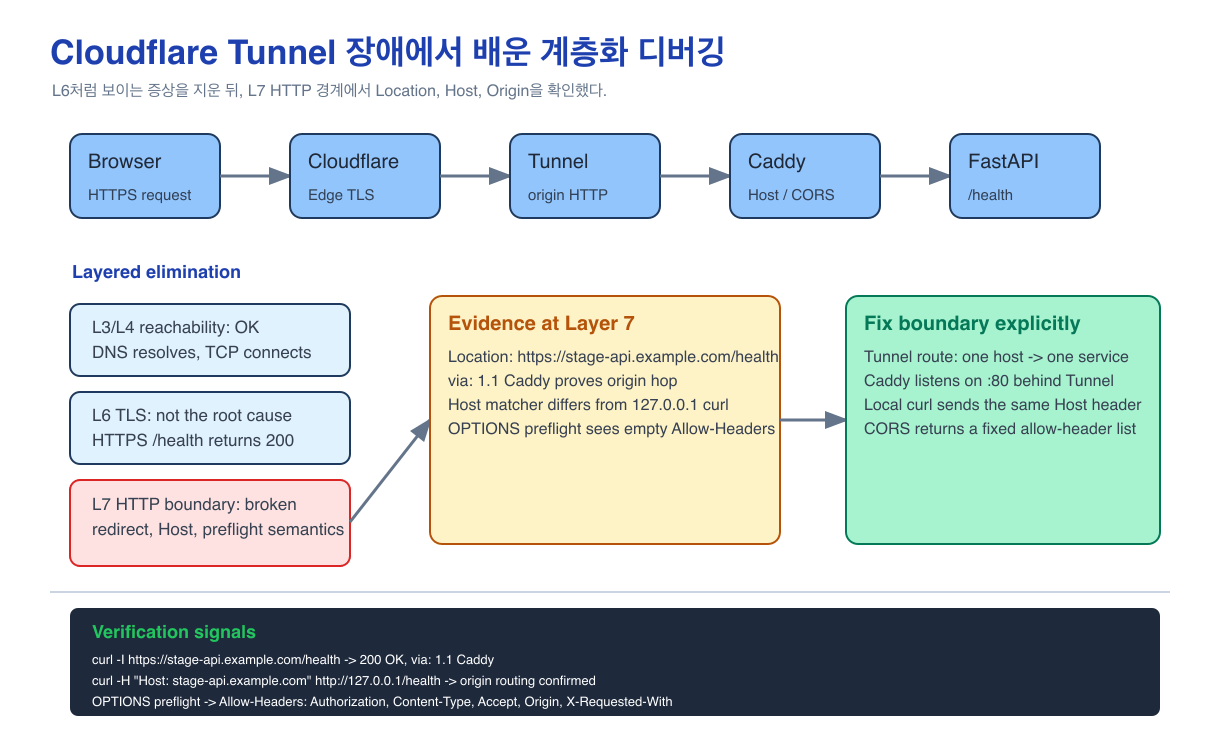
Backend developers usually live at layer 7. We look at API paths, status codes, request headers, and CORS. I reacted the same way when I saw ERR_TOO_MANY_REDIRECTS in the browser after putting a stage API behind Cloudflare. I immediately suspected redirects and CORS.
But once Cloudflare Tunnel sits in the path, it becomes dangerous to name the problem too early. It may look like TLS. It may look like origin connectivity. It may turn out to be an HTTP interpretation problem inside the reverse proxy. What helped here was not guessing "this is L7" quickly. It was clearing layer 3/4 connectivity, clearing layer 6 TLS, and then returning to layer 7 with better evidence.
Summary
- Problem: Behind Cloudflare Tunnel, a stage API showed what looked like one blended failure: redirect loops,
308,Connection reset, and CORS errors. - Approach: Instead of concluding from the familiar layer-7 symptoms, I split the debugging path into DNS/connectivity, TLS, reverse-proxy behavior, and application headers.
- Decision: Layer 3/4 and layer 6 were not the main cause. The decisive signals were back in layer 7:
Location,via: 1.1 Caddy,Host, andOPTIONSpreflight behavior. - Fix: I separated the Tunnel route, Caddy
:80listener, Host-based routing, and CORS preflight handling, and corrected each independently. - Lesson: Layered debugging is less about naming the right layer early and more about eliminating the wrong layers quickly.
Context
The stack looked roughly like this:
Browser
  -> Cloudflare Edge
  -> Cloudflare Tunnel
  -> Ubuntu origin
  -> Docker port 80
  -> Caddy
  -> FastAPI
Cloudflare was set to Full (strict) for SSL/TLS. According to Cloudflare's docs, the SSL/TLS mode separately affects the visitor-to-Cloudflare connection and the Cloudflare-to-origin connection. Full (strict) also verifies the origin certificate.
That is why the common explanation, "Flexible mode causes an HTTP/HTTPS redirect loop," was not enough here. With Tunnel in the path, I also needed to understand how cloudflared forwarded the request to origin and how Caddy interpreted the incoming host and scheme.
Why I Had to Split It by Layer
If you only look at ERR_TOO_MANY_REDIRECTS, the browser makes it feel as though the problem has already been named. But that message is only the final layer-7 symptom seen by the browser.
The earlier questions were:
Layer 3/4: Does the request reach the domain and port?
Layer 6: Is TLS negotiation or certificate validation failing?
Layer 7: Do the HTTP status, Location, Host, and Origin headers match the intended route?
Once I forced the debugging into that order, "Cloudflare issue," "CORS issue," and "server issue" became smaller, more testable claims. In this case, the lower layers were mostly healthy. The misalignment was in HTTP redirect semantics and header interpretation.
At First I Treated It Like TLS Trouble
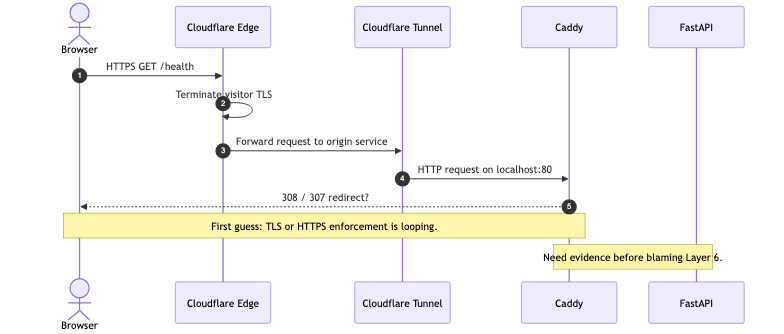
My first hypothesis was a conflict between SSL/TLS mode and HTTPS enforcement. The browser said redirect loop. The Cloudflare dashboard had SSL/TLS controls. So I initially focused near layer 6.
Cloudflare: receives HTTPS
Origin: thinks the request arrived as HTTP
Caddy or app: redirects to HTTPS
Cloudflare: forwards back to origin
If that were the real path, the Location header would keep pointing back into the same scheme bounce. So the first check was a simple curl -I to inspect the redirect target.
The Evidence That Mattered
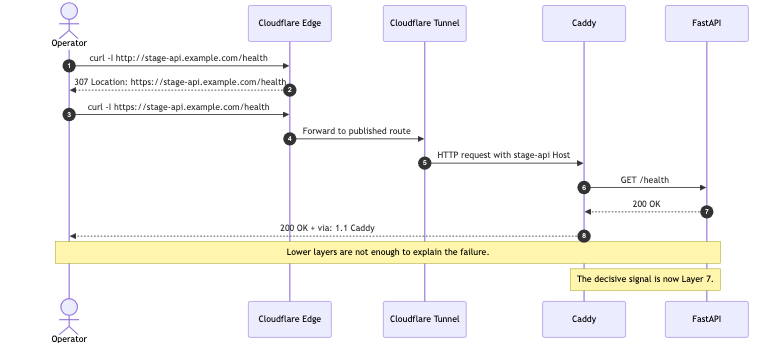
The first useful clue came from /health.
GET http://stage-api.example.com/health
-> 307 Internal Redirect
-> Location: https://stage-api.example.com/health

GET https://stage-api.example.com/health
-> 200 OK
-> via: 1.1 Caddy
That result showed that the HTTP-to-HTTPS redirect itself was not the main problem. The more important signal was that https://.../health returned 200 OK and included via: 1.1 Caddy. The request had reached Caddy. It was not ending only at Cloudflare edge.
The root path looked different:
curl -I https://stage-api.example.com/

HTTP/2 404
content-type: application/json
via: 1.1 Caddy
That was not a redirect loop either. It was a normal JSON 404 because the API did not expose /.
Another signal was a 308 Permanent Redirect on https://stage-api.example.com/health during one stage of testing. I treated that not as a TLS failure but as an HTTP redirect caused by a mismatch between Tunnel's origin HTTP boundary and Caddy's scheme or host handling.
There was also a Connection reset by peer when hitting localhost:80 in some local checks. Seeing docker-proxy there can be misleading. docker-proxy only bridges the host port to the container port. The real question is whether Caddy is actually listening on :80 behind it.
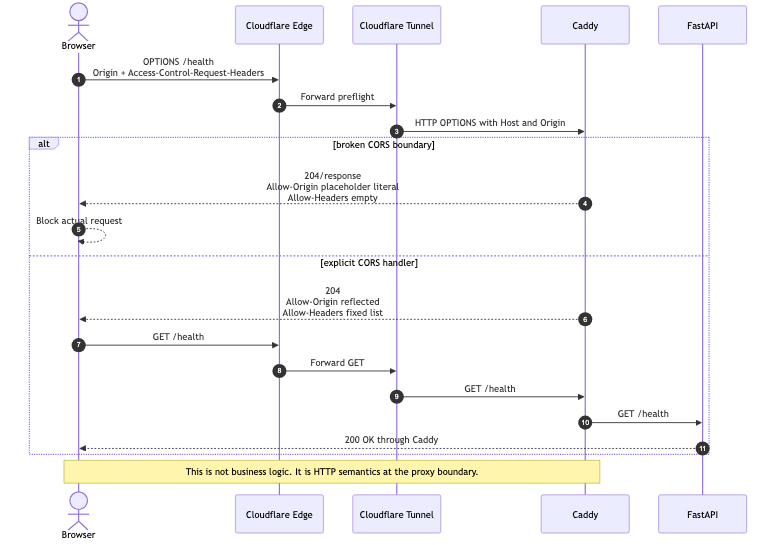
The last cluster of evidence came from CORS:
Access-Control-Allow-Origin: {request.header.Origin}
Access-Control-Allow-Headers:
The first line showed that a Caddy placeholder was leaking as a literal string instead of being substituted. The second line meant the browser had no usable allowed-header list during preflight.
What This Was Not
This was not a generic "network is broken" problem.
- DNS and Cloudflare edge reachability were working.
- TCP connectivity was working.
/healthcould pass through Caddy to FastAPI.- The main issue was not a certificate-validation failure.
So the accurate summary was narrower: this was a layer-7 failure around reverse-proxy and gateway behavior.
The three actual breakpoints were:
- HTTP redirect semantics: who enforces HTTPS
- Host-based routing: which host Caddy thinks it is serving
- CORS preflight behavior: whether the browser receives the headers it needs from
OPTIONS
How I Fixed It
First, I cleaned up the Cloudflare Tunnel routes explicitly.
In the broken configuration, a wildcard route could absorb the stage host unintentionally. If one Tunnel application route claims every subdomain, it becomes easy for a host to land on the wrong origin service.
The target shape I wanted was:
stage-api.example.com -> http://localhost:80
ssh.example.com       -> ssh://localhost:22
static asset domain   -> not routed through this Tunnel application
Second, I made Caddy's origin HTTP entrypoint explicit:
{
  auto_https off
}

:80 {
  @stage host stage-api.example.com

  handle @stage {
    reverse_proxy app-api-1:8000
  }

  respond 404
}
Behind Tunnel, Cloudflare already owns the visitor-facing HTTPS boundary. Letting origin Caddy clearly accept HTTP on :80 made the model much simpler. The important point was not to hope "Caddy will figure it out," but to declare :80 directly.
Third, I made the local Host-based test match the real Host-based routing logic:
curl -i -H "Host: stage-api.example.com" \
  http://127.0.0.1/health
If Caddy routes by Host, then curl http://127.0.0.1/health is not the same request. Its host is 127.0.0.1, not the stage domain.
Fourth, I debugged CORS starting from OPTIONS, not from a failing GET:
curl -i -X OPTIONS \
  -H "Origin: http://127.0.0.1:5500" \
  -H "Access-Control-Request-Method: GET" \
  -H "Access-Control-Request-Headers: authorization,content-type" \
  https://stage-api.example.com/health
For development, an explicit header list was easier to reason about:
handle @options {
  header Access-Control-Allow-Origin "{http.request.header.Origin}"
  header Access-Control-Allow-Credentials "true"
  header Access-Control-Allow-Methods "GET, POST, PUT, PATCH, DELETE, OPTIONS"
  header Access-Control-Allow-Headers "Authorization, Content-Type, Accept, Origin, X-Requested-With"
  header Access-Control-Max-Age "86400"
  respond 204
}
Reflecting headers from the request dynamically can fail if Access-Control-Request-Headers is absent or gets lost across a proxy boundary. For the development stage, the fixed list was more explicit and easier to verify.
That said, reflecting Origin together with Credentials=true is not a good production default. If the API uses cookies or authenticated browser calls, production should move to an allowlist.
Verification
I verified this layer by layer instead of by asking "does it work now?" once.
curl -I https://stage-api.example.com/healthHere I wanted 200 OK plus via: 1.1 Caddy. Seeing only server: cloudflare makes it hard to tell whether the response came from Cloudflare edge or origin.
curl -i -H "Host: stage-api.example.com" \
  http://127.0.0.1/health
This checked whether Docker port mapping and Caddy Host matching were aligned.
curl -i -X OPTIONS \
  -H "Origin: http://127.0.0.1:5500" \
  -H "Access-Control-Request-Method: GET" \
  -H "Access-Control-Request-Headers: authorization,content-type" \
  https://stage-api.example.com/health
This checked Access-Control-Allow-Origin, Access-Control-Allow-Credentials, Access-Control-Allow-Methods, and Access-Control-Allow-Headers together.
The verified scope here is limited. I am not claiming that every browser-side CORS issue disappeared forever. The verified result is that the stage API request path reaches Caddy and FastAPI through Cloudflare, and that a representative preflight request now receives the headers the browser needs.
What I Learned
One reason we learn the network stack in layers is not to memorize labels. It is to stop wasting time on the wrong layer.
I began by looking at Cloudflare's SSL/TLS mode. That was a valid check, but it was not enough. In a Tunnel setup, TLS mode alone does not explain the whole origin path.
The good decision in this incident was not "I identified it as L7 immediately." The better decision was to let the TLS-looking symptoms stay hypotheses, verify that layer 3/4 and layer 6 were mostly alive, and then return to layer 7 with concrete signals: Location, Host, Origin, and Access-Control-*.
Backend developers spend most of their time in layer 7. But production debugging sometimes requires briefly dropping to lower layers so that, when you come back up, you know whether the HTTP status is application behavior or proxy behavior.
The decision rule changed like this:
- When I see
ERR_TOO_MANY_REDIRECTS, I inspect theLocationheader first. - On Cloudflare responses, I look for origin-hop signals such as
via: 1.1 Caddy. - If there is Host-based routing, I include the Host header in local tests.
- I reproduce CORS failures from
OPTIONSpreflight first, not from the final GET. - If
docker-proxyappears, I treat it only as evidence of Docker port mapping, not proof that the app behind it is actually listening.
Next Time
When an API behind Cloudflare Tunnel behaves strangely, I will not name it "certificate trouble" or "a CORS bug" immediately. I will walk the layers in order:
1. Layer 3/4: Does the request reach the domain and port?
2. Layer 6: Is TLS negotiation or certificate validation failing?
3. Layer 7: Is the Tunnel route sending traffic to the intended service?
4. Layer 7: Does the Caddy Host matcher agree with the request Host?
5. Layer 7: Does the request reach FastAPI?
6. Layer 7: Does the browser receive a valid preflight response?
In cases where the network path is fine but only the browser fails, I still need to read the HTTP evidence closely: status, Location, Host, Origin, and Access-Control-*. But only after I have ruled out lower-layer failure.