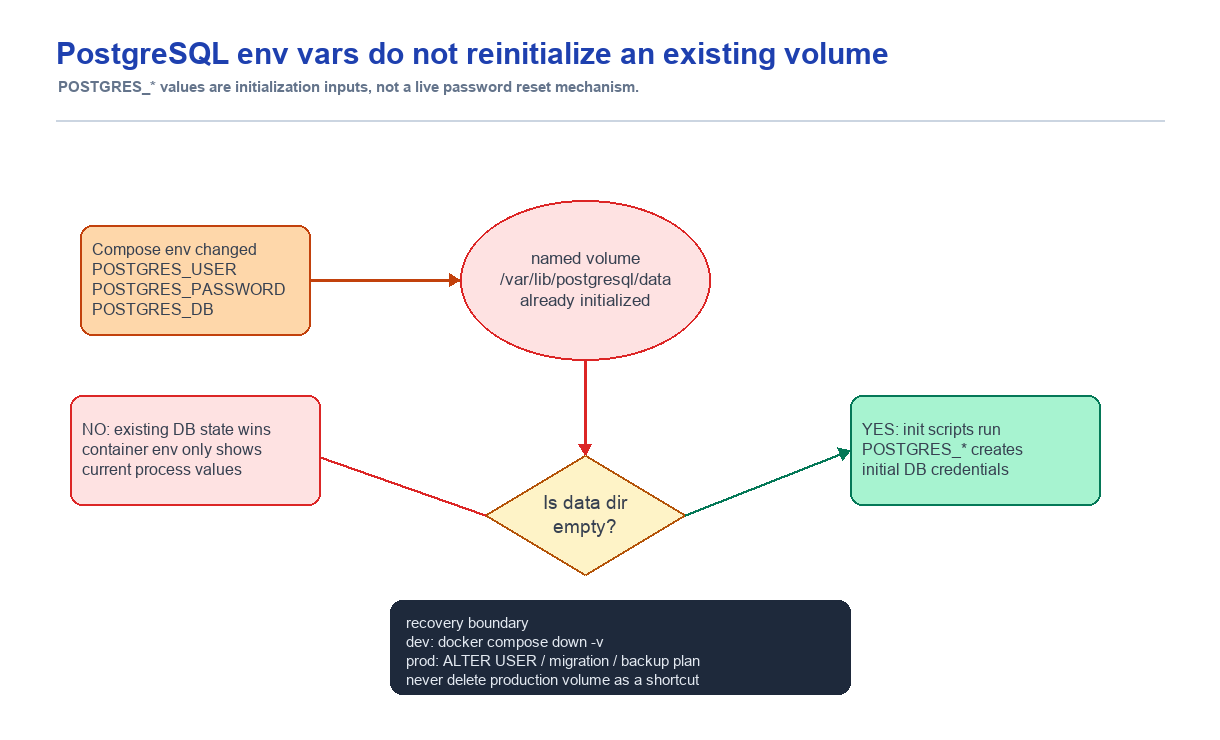
The new environment variables were visible inside the PostgreSQL container, but Spring Boot kept failing with the old password. At first, I suspected .env, Docker Compose, and networking. The key log line was Skipping initialization. The issue was that POSTGRES_* values are not live settings that rewrite database state on every start. They are initialization inputs used only when the data directory is empty.
Summary
- Problem: I changed PostgreSQL environment variables in Docker Compose, but the Spring Boot server still failed database authentication.
- Judgment: The important state was not the container env. It was the PostgreSQL data directory and the named volume.
- Cause: An existing named volume was reused, so PostgreSQL skipped database initialization.
- Fix: In development, I removed the volume with
docker compose down -vand recreated the stack. In production, user/password changes must be done explicitly with SQL.
Context
I was running nginx, PostgreSQL, and a Spring Boot server together with Docker Compose. The PostgreSQL container received POSTGRES_USER, POSTGRES_PASSWORD, and POSTGRES_DB as environment variables, and the Spring Boot server read the same .env values.
version: "3.8"

services:
  nginx:
    container_name: app-proxy
    build:
      context: ./nginx
      dockerfile: Dockerfile
    image: app-proxy:1.0.0-compose
    ports:
      - "80:80"
    networks:
      - app-network

  postgresdb:
    container_name: app-db
    build:
      context: ./postgresDB
      dockerfile: Dockerfile
    image: app-db:1.0.0-compose
    environment:
      POSTGRES_USER: ${DB_USERNAME}
      POSTGRES_PASSWORD: ${DB_PASSWORD}
      POSTGRES_DB: ${DB_NAME}
    ports:
      - "5432:5432"
    volumes:
      - postgres_data:/var/lib/postgresql/data
    networks:
      - app-network

  web-application-server:
    container_name: app-was
    build:
      context: ./web-application-server
      dockerfile: Dockerfile
    image: app-was:1.0.0-compose
    env_file:
      - .env
    depends_on:
      - postgresdb
    networks:
      - app-network

volumes:
  postgres_data:

networks:
  app-network:
    driver: bridge
On the surface, nothing looked wrong. When I checked env inside the PostgreSQL container, the environment variables were present. So my first suspicion was the Spring Boot configuration or the Docker network.
Problem
The Spring Boot server kept failing PostgreSQL authentication.
app-was | org.hibernate.exception.GenericJDBCException:
app-was |   unable to obtain isolated JDBC connection
app-was |   [FATAL: password authentication failed for user "app_user"]
When I entered the PostgreSQL container and checked the actual users and databases, they had not been initialized with the values I expected. The container had the environment variables, but the database state did not reflect them.
At first this looked strange. If the environment variables were present, I expected PostgreSQL to have created the user and database from those values.
The Clue
The key message was in the logs.
app-db | PostgreSQL Database directory appears to contain a database; Skipping initializationPostgreSQL was not ignoring the environment variables. It was not running the initialization process again.
Why This Happened
In the official PostgreSQL Docker image, Docker-specific environment variables such as POSTGRES_USER, POSTGRES_PASSWORD, and POSTGRES_DB are used to create the initial database when the data directory is empty.
When the container starts with an empty data directory, initdb runs. That is when the default user and database are created. Scripts under /docker-entrypoint-initdb.d/, such as .sql, .sql.gz, and .sh files, also run during this initialization step.
If the data directory already contains PostgreSQL data, initialization is skipped. In that case, changing .env or docker-compose.yml later does not automatically change the existing database user or password.
The official image documentation states the same behavior: these Docker-specific environment variables affect a container started with an empty data directory, while an existing database is left as-is on startup.
Cause
During debugging, I ran docker compose up multiple times. The named volume created on the first run, postgres_data, kept being reused.
volumes:
  - postgres_data:/var/lib/postgresql/data
Removing the container does not automatically remove a named volume. So even when a new container started, PostgreSQL saw a data directory that already contained an initialized database.
The sequence was:
/var/lib/postgresql/dataalready contains data.- PostgreSQL treats it as an initialized database.
- Initialization based on
POSTGRES_USER,POSTGRES_PASSWORD, andPOSTGRES_DBis skipped. - The old user/password remain, so they no longer match the Spring Boot connection settings.
Fix
This was a development environment, and I did not need to preserve the existing data. I brought the Compose stack down with the volume, then started it again.
docker compose down -v
docker compose up --build
The -v option also removes named volumes created by Compose. After that, a new volume was created, the PostgreSQL data directory was empty, and environment-variable-based initialization ran again.
After this, Spring Boot JPA connected to PostgreSQL normally.
Production Caution
In development, docker compose down -v is a fast fix. In production or shared development databases, it is dangerous because it deletes the data stored in the volume.
If a production user or password has to change, do not remove the volume. Change it explicitly with SQL.
ALTER USER app_user WITH PASSWORD 'new-password';Or create the required user and grant privileges.
CREATE USER app_user WITH PASSWORD 'new-password';
GRANT ALL PRIVILEGES ON DATABASE app_db TO app_user;
Lesson
PostgreSQL Docker container environment variables are not settings that are reapplied every time the container starts. They are inputs used to create the database at first initialization.
So when debugging a database through Docker Compose, the container is not enough. The volume state has to be checked too. docker compose down alone does not reset data. If the named volume remains, PostgreSQL keeps using the existing database.
The rule I keep now is:
- Container environment variables are the values passed into the current container.
- PostgreSQL users and passwords are database state stored in the data directory.
POSTGRES_*environment variables are applied only when an empty data directory is initialized.- To fully recreate a development database, remove the volume too.
- For production databases, use SQL migrations or privilege changes instead of deleting volumes.
How I Would Judge This Next Time
If changing a DB container env does not change state, I first ask whether that env is runtime config or initialization input. For services like PostgreSQL, where the data directory is the source of truth, I check the volume before the container.
In development, down -v can be a quick reset. In production, the same command is data deletion. Production changes belong in SQL migrations or explicit permission changes.