Adding more photos did not automatically make Place2Page landing pages better. My first instinct was to add another prompt rule telling the model to "use the photos well." After looking at the actual output, the problem was not wording. It was the data path. Once the photos were analyzed first and passed as structured photo_intelligence metadata, the final HTML model could use them as hero candidates, gallery evidence, brand color cues, and alt text sources instead of treating them as a loose asset list.
Summary
- Problem: Even after the Hallmark combined prompt, the final HTML model still had to infer photo roles, color usage, and alt text on its own.
- Decision: Instead of making the prompt longer, I analyzed photos first and added explicit visual metadata to the generation payload.
- Result: The automated score tied the previous variant, but human review showed more intentional photo placement and color use, and the debug screen made the cause easier to inspect.
- Lesson: Multimodal product quality is less about "including images" and more about turning image understanding into stable pipeline input.
The limit of the previous step
The earlier Hallmark combined experiment helped. Combining structure, anti-slop copy, and responsive hardening improved the information flow and visual rhythm compared with the baseline. Photos, however, were still mostly outside the text prompt.
For a restaurant photo set, the model has to answer questions like these:
- Which photo should be the hero?
- Which photos are menu or detail evidence?
- Which photos would make text overlays hard to read?
- Which colors can work as natural brand accents?
- How should the alt text describe the photo without inventing details?
When all of those decisions were left to the final HTML model at once, the result often felt vague. Photos were present, but the page did not always look as if it understood them.
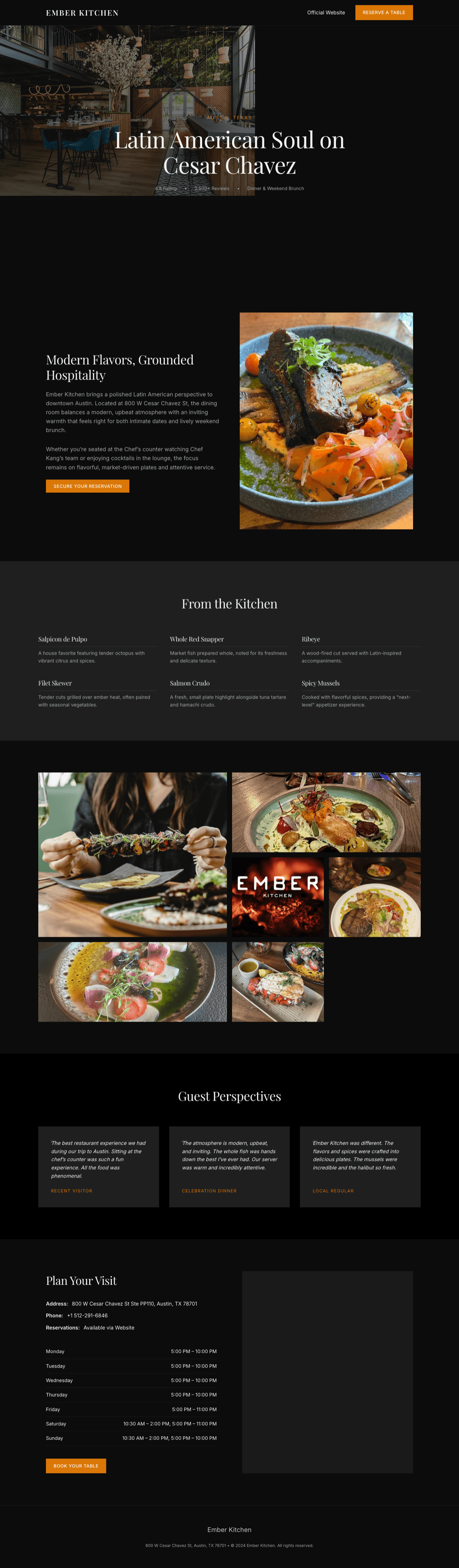
This page was publishable. The problem was that important decisions were hidden inside model inference. The part I needed to change was not prompt wording. It was the data path.
I changed the question
The first question was, "Should I adjust the prompt so it uses photos better?" I changed it midway.
What if I analyze the photos first and pass structured visual metadata that the final HTML model can use?
The core of the new payload was photo_intelligence. The actual payload was longer, but the decision unit passed to the model looked roughly like this.
{
  "analysis_status": "complete",
  "analyzed_photo_count": 8,
  "brand_key_color": {
    "hex": "#FF4500",
    "source": "photo_analysis"
  },
  "photos": [
    {
      "alt_text": "Interior of the restaurant with blue chairs...",
      "visible_subjects": ["restaurant bar", "dining table", "pendant lights"],
      "dominant_colors": [
        { "hex": "#005680", "role": "accent" },
        { "hex": "#B5845E", "role": "surface" }
      ],
      "suggested_roles": ["hero", "gallery"],
      "placement_hint": "Use as the opening atmosphere image."
    }
  ]
}
This metadata tells the model three things: what is visible, where each photo may fit, and which colors or atmosphere can influence the style. To make multimodal input a product feature, this intermediate layer was necessary.
What changed in the output
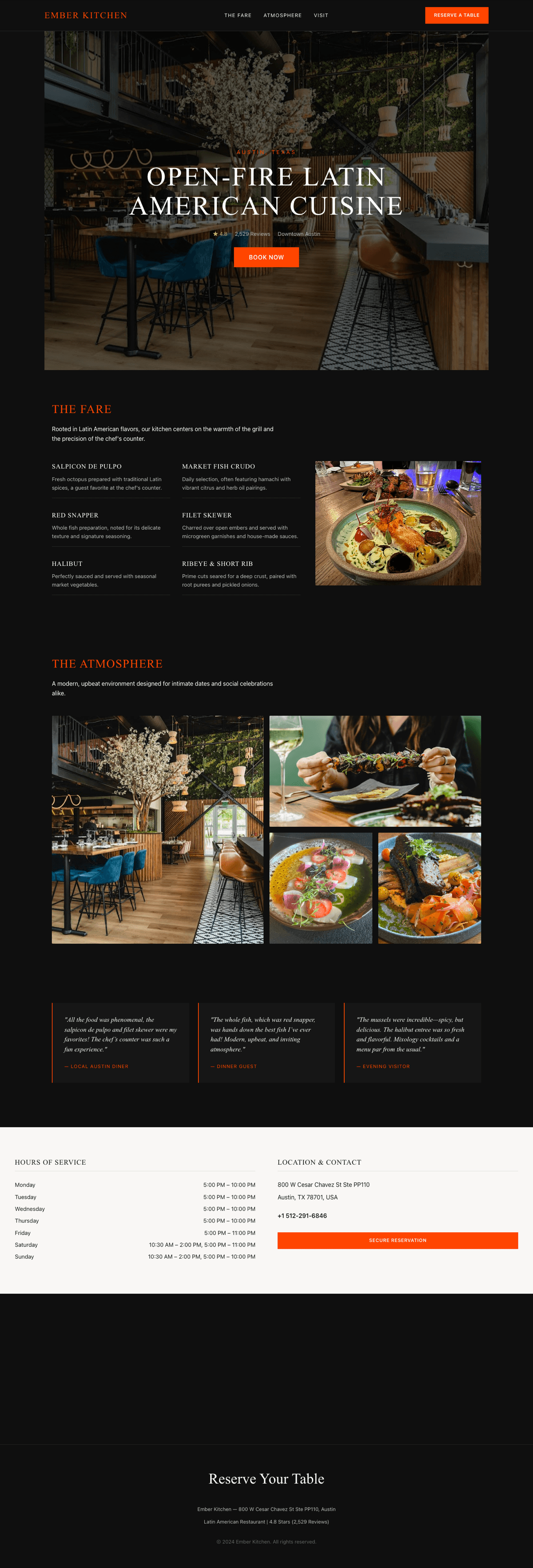
In the restaurant result, an interior photo became the center of the hero and atmosphere, while food photos moved into menu and detail sections. The orange accent was no longer random decoration. It could be tied back to open-fire cooking and food photography cues.
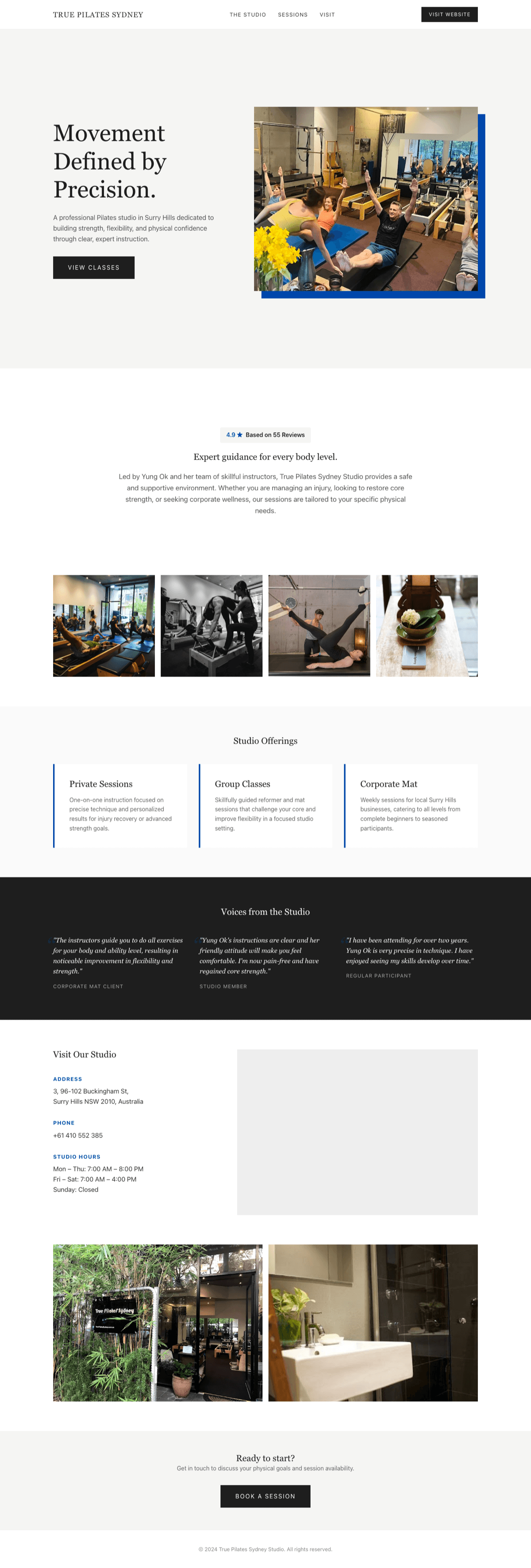
The fitness studio needed different signals. Reusing a warm orange restaurant cue would have looked wrong. In this case, movement, classes, and a bright studio environment mattered more, and the output moved toward white, black, and blue accents.
In the workshop case, craft detail photos worked as gallery, proof, and detail evidence. One photo analysis failed and was recorded as partial, but generation continued.

That failure policy mattered. Photo intelligence is a quality-improving input, not a hard dependency that should block landing page generation.
I separated debug payload from generation payload
The implementation detail I was most careful about was separating the payload operators need from the payload the model needs.
The debug payload kept a wide trail, including failures. It needed enabled, disabled, skipped, failed, partial, and complete states; model name; photo count; failed count; per-photo errors; a raw-ish summary; and brand color rationale. Later, an operator should be able to answer, "Why did this photo become the hero?", "Why was this color used?", or "Why was photo analysis missing?"
The generation payload was smaller. The final model only received values directly useful for generation: alt text, visible subjects, dominant colors, suggested roles, placement hints, and brand key color. Too much failure noise or internal state can make HTML generation less stable.
Without this distinction, an AI feature quickly becomes a black box. Even when the result looks better, you cannot explain why. When it fails, you cannot see where.
Promotion criteria
The experiment was ambiguous if judged only by automated scores.
| Variant | Results | Published | Average score | Verdict |
|---|---|---|---|---|
combined |
4 | 4 | 100.0 | 4 pass |
photo-intelligence |
4 | 4 | 100.0 | 4 pass |
I did not claim that photo intelligence won on the automated metric. The numbers were tied.
Instead, I used a different promotion standard.
- It did not break the existing quality guardrails.
- Human review found the photo and color usage more intentional.
- Improving the runtime data path was more durable than adding more prompt text.
- The analysis result was visible in debug logs and operator screens.
- Failure still had a fallback boundary, so generation could continue.
After code deploy and a smoke test, I promoted it to the production runtime default and kept the previous combined profile as a rollback target.
Verification
I was not verifying that "using photos always makes the page prettier." The scope was narrower.
- Photo analysis is recorded as success, partial, or failed.
- The generation payload receives only the metadata it needs, without internal debug noise.
- Photo analysis failure does not become full generation failure.
- The automated quality guardrail still passes.
- Human review can explain photo roles and color usage more clearly.
Good AI output does not come from one model call. It comes from the whole pipeline: analyzing input, structuring it, filtering it, recording it, showing it to operators, and deciding when it is safe enough to promote.
How I will judge this next time
- When multimodal quality is weak, I will first ask how image understanding is represented and passed downstream, not just whether images were included.
- When automated scores tie, I will compare human-visible intent, debuggability, and fallback boundaries.
- I will not leave all photo decisions to the model. The product should define decision units such as hero candidate, detail evidence, alt text, and dominant color.
- AI helper features that can fail should not be hard dependencies. Failure states should be recorded, while core generation continues where possible.
- Public write-ups should not expose real place names, internal profile or run IDs, or operator URLs.