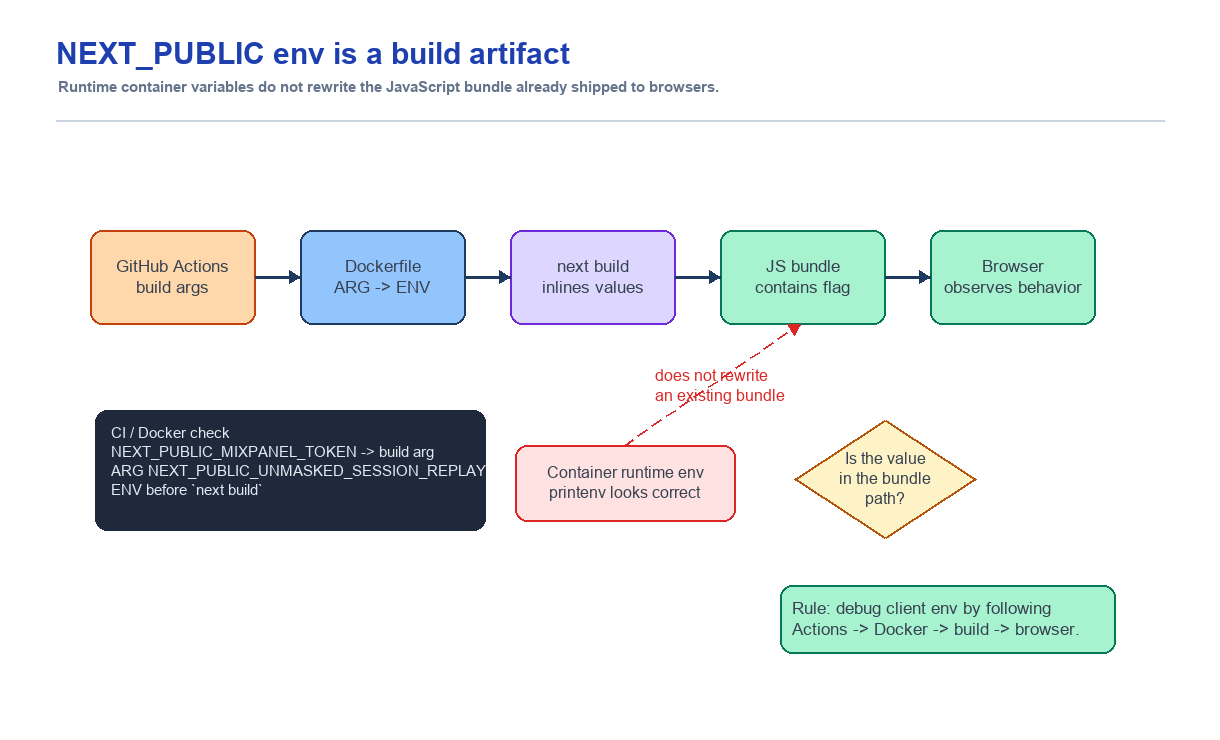
The production container had the environment variable, but the Mixpanel Session Replay setting in the browser did not change. At first I suspected a missing runtime environment variable. The actual boundary was earlier: next build, not container startup. I debugged the path by treating NEXT_PUBLIC_ values as build artifacts inlined into the client bundle, then checking the GitHub Actions build args, Dockerfile ARG/ENV, and the browser bundle in that order.
Summary
- Problem: The env value existed in the production container, but the Mixpanel Session Replay behavior in the browser did not change.
- Judgment: This was a build pipeline problem, not just a container runtime env problem.
- Cause:
NEXT_PUBLIC_values are embedded into the Next.js client bundle at build time, so changing only runtime env does not change already-built JavaScript. - Lesson: Frontend env debugging does not end with
printenvinside the server. The real question is which value was used to build the bundle that users receive.
Context
While wiring Mixpanel Session Replay into Place2Page, one production flag caused confusion.
The intended behavior was simple. When a specific NEXT_PUBLIC_ flag was enabled in production, the browser-side Mixpanel Replay setting should change. I added the GitHub Actions variable, and when I entered the production container and ran printenv, the value was there.
But the browser behavior did not change.
That looked strange at first. If the environment variable existed in the container, why did the frontend not know about it?
Problem
For a backend server, "read runtime env" is usually a natural model. The environment variable exists when the container starts, and server code can read that value while handling a request.
Next.js client code is different.
Code that runs in the browser does not directly read process.env from inside the container. It downloads and executes the JavaScript bundle produced by next build.
The Next.js documentation explains that NEXT_PUBLIC_ environment variables are inlined into the client JavaScript bundle at build time. So although the name can sound like public runtime env, in practice it becomes part of the build artifact.
That means printenv NEXT_PUBLIC_SOMETHING=true can be visible in the production container while the already-built JS bundle still contains false.
Initial Hypothesis
My first assumption was that the production env configuration was wrong, so I checked the env values on the server.
But checking only the container runtime env was not enough. The important question was different:
Was this value present when
next buildran?
For Next.js client env issues, the check order has to change.
- Does GitHub Actions pass the value into the Docker build as a build arg?
- Does the Dockerfile receive that value as an
ARG? - Is it exposed as
ENVin the stage wherenext buildruns? - Was the production bundle actually built with that value?
- Is the deployed browser code receiving the new bundle?
Runtime printenv answers only part of that chain.
Evidence
The order of evidence mattered in this issue. Following the repository path made it clear why runtime env alone was not enough.
The GitHub Actions web image build step passed client env through build-args.
NEXT_PUBLIC_MIXPANEL_TOKEN=...
NEXT_PUBLIC_MIXPANEL_RECORD_SESSIONS_PERCENT=...
NEXT_PUBLIC_UNMASKED_SESSION_REPLAY=...
APP_ENV=production
The Dockerfile accepted those values as ARG and exposed them again as ENV before next build.
ARG NEXT_PUBLIC_MIXPANEL_TOKEN
ARG NEXT_PUBLIC_MIXPANEL_RECORD_SESSIONS_PERCENT=100
ARG NEXT_PUBLIC_UNMASKED_SESSION_REPLAY=false

ENV NEXT_PUBLIC_MIXPANEL_TOKEN=$NEXT_PUBLIC_MIXPANEL_TOKEN \
    NEXT_PUBLIC_MIXPANEL_RECORD_SESSIONS_PERCENT=$NEXT_PUBLIC_MIXPANEL_RECORD_SESSIONS_PERCENT \
    NEXT_PUBLIC_UNMASKED_SESSION_REPLAY=$NEXT_PUBLIC_UNMASKED_SESSION_REPLAY

RUN npm run build
The client code then read this value from process.env.NEXT_PUBLIC_UNMASKED_SESSION_REPLAY to build the Mixpanel Replay masking configuration.
const UNMASKED_SESSION_REPLAY = resolveUnmaskedSessionReplay(
  process.env.NEXT_PUBLIC_UNMASKED_SESSION_REPLAY
)
So if the value existed only in the production container runtime and not when npm run build ran, the browser bundle could still be built with the old value.
The commit history pointed to the same conclusion. 98c38da2 fix(ci): wire NEXT_PUBLIC_MIXPANEL_TOKEN into web image build changed both the GitHub Actions build arg and the Dockerfile. fc262431 fix: wire mixpanel replay unmask flag also touched the workflow, Dockerfile, Mixpanel wrapper, tests, and docs. The fix point was not one production .env value. It was the whole build pipeline.
The Docker Boundary That Mattered
This issue made me revisit the difference between Docker ARG and ENV.
In Docker's documentation, ARG is a value that can be passed at build time, while ENV is an environment variable available to later instructions in the build stage and at container runtime. They look similar, but their lifetimes are different.
Next.js client env is needed when next build runs. That means GitHub Actions has to pass the value with --build-arg, the Dockerfile has to receive it as ARG, and the build stage has to expose it with ENV NEXT_PUBLIC_...=$NEXT_PUBLIC_....
By contrast, adding a value to production .env after the image has already been built can matter for server runtime, but it is too late for the client bundle.
This is the confusing part.
- The Docker container can have the env value.
- Next.js server code can read that env value.
- Browser code still receives already-built JavaScript.
All three can be true at the same time.
Fix Approach
I set the debugging order like this.
First, I checked the web image build step in the GitHub Actions workflow and confirmed whether the affected NEXT_PUBLIC_ value was passed as a build arg.
Next, I checked the Dockerfile. I confirmed that the build stage declared the value as an ARG and exposed it as ENV before next build ran.
Finally, I checked the production container and the real browser behavior. I did not stop at container env. I also checked whether the Session Replay-related browser events matched the intended behavior.
The fix was not "add the value to production env." It was "inject the client env at image build time."
Lessons
This issue stays confusing unless Docker is part of the mental model.
At first I thought seeing the env value inside the container was enough. But the frontend bundle is not created when the container starts. It is created when the image is built.
In Next.js, NEXT_PUBLIC_ is closer to a public build-time constant than public runtime config. PUBLIC does not mean the value can be changed at any time. It mostly means the value will be exposed to the browser.
So in a Next.js + Docker setup, printenv inside the server is not enough for client env debugging.
How I Will Judge This Next Time
When another Next.js client env issue appears, I will not treat production container printenv as final evidence. I will first check whether the value existed when the client bundle was built.
My production client env checklist is:
- Was it passed as a build arg from GitHub Actions?
- Does the Dockerfile build stage declare the
ARG? - Is it exposed as
ENVbeforenext build? - Is the value safe to expose publicly?
- After deploy, was the actual browser bundle behavior verified?
The last point matters most. Client env can look correct in code and in the container. But users execute the browser bundle, so the final question is which value that bundle was built with.