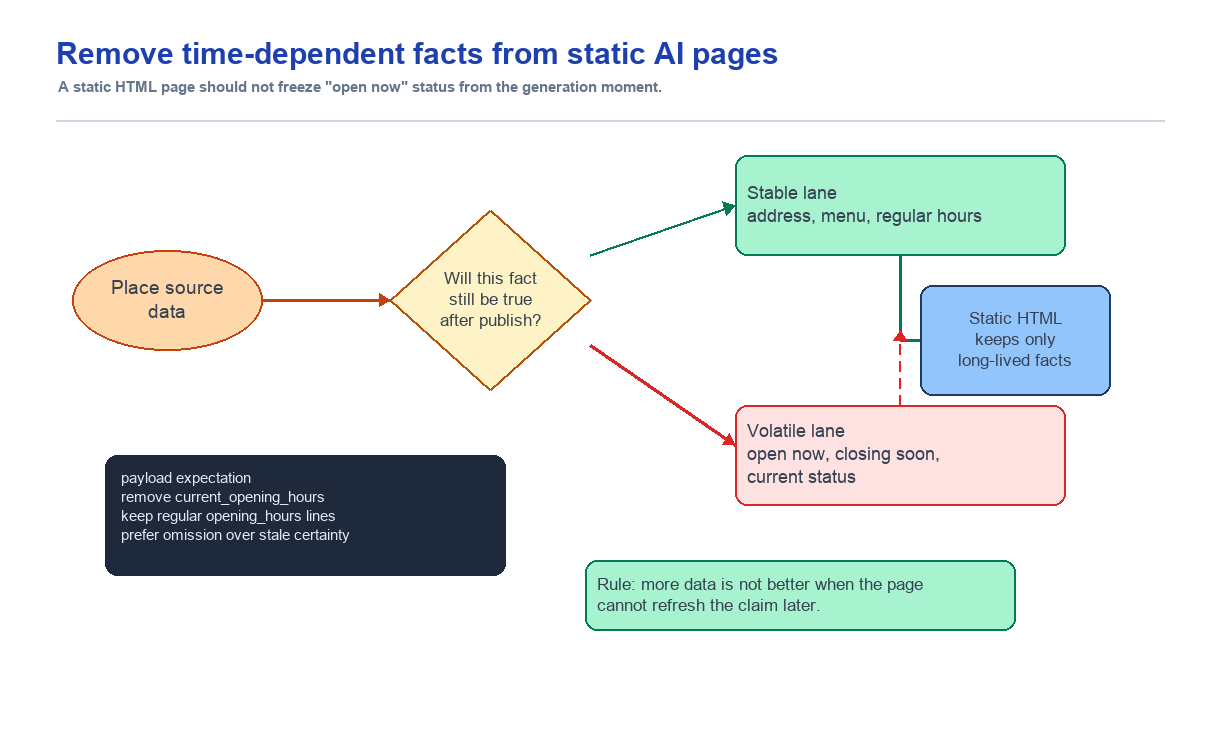
It was tempting to give the AI more place data and expect a better landing page. But values like "open now" may be correct at generation time and still become risky as soon as they are saved into static HTML. I treated this as a data modeling problem, not a prompt wording problem: remove data that does not match the lifetime of the output.
Summary
- Problem: AI-generated static landing pages could freeze creation-time information such as "open now" into the visible page.
- Decision: Instead of telling the model not to use that data, it was safer not to provide data whose lifetime did not match the static output.
- Fix: Remove time-dependent fields such as
current_opening_hoursfrom the final generation payload, and keep only durable opening-hours information. - Lesson: Data that belongs in a static page and data that is valid only at request time need to be handled differently.
Context
Place2Page turns place data into static landing pages. When a user enters a URL, the service fetches information such as the place name, address, photos, reviews, menu, and opening hours. The AI then generates HTML from that data.
At first, it seemed better to give the model as much information as possible. More data could produce a richer page.
Opening hours seemed like part of that. If the model knew regular hours, current open status, and the next close time, the visit-planning section might become more useful.
But that assumption breaks down once the output is static.
Problem
A statement can be true at generation time and false the next day.
For example, imagine the AI writes this while generating a page on Monday night:
Currently closed.
That may be true at that moment. But the HTML is saved as a static page. A user visiting on Tuesday afternoon could still see "Currently closed."
The reverse can happen too. A page generated on Sunday afternoon could say "Open now" and still show that on a Monday closure day.
This is not just a wording issue. It can become incorrect information that affects a user's decision to visit.
Initial Hypothesis
At first, I thought a prompt instruction like "do not mention current status" would be enough.
But if the model input includes data such as current_opening_hours, the model treats it as an important fact. A landing-page generation model is also trying to show useful visit-planning information, so it naturally tries to surface current opening status.
That made prompt-only prevention too weak. Data the model should not use should be removed from the payload in the first place.
Evidence
The issue could happen in both Naver place fetches and Google place fetches.
Regular opening hours are relatively durable. A line like "Mon-Fri 10:00-21:00" can remain on the page because users can interpret it with the current date and time.
But statements like "Open now," "Currently closed," "영업 종료," and "곧 영업 시작" are different. They are tightly bound to the request time.
If that data enters the final model input, the model can pull it back into visible copy no matter how careful the prompt is.
So I checked both code and tests.
The generation payload test deliberately includes time-dependent data.
{
  "opening_hours": [
    "영업 종료",
    "10시 30분에 영업 시작",
    "매일 10:30 - 20:00",
    "Sunday: Closed"
  ],
  "current_opening_hours": {
    "open_now": false,
    "next_open_time": "2026-05-15T10:30:00+09:00",
    "next_close_time": "2026-05-15T20:00:00+09:00"
  }
}
The expected result is the opposite. The final model input should not contain current_opening_hours, and opening_hours should keep only lines that are safe to persist.
"current_opening_hours" not in payload["place_source_data"]
payload["place_source_data"]["opening_hours"] == [
  "매일 10:30 - 20:00",
  "Sunday: Closed"
]
The Naver fetcher test points in the same direction. The input contains fetch-time status strings such as "영업 종료" and "10시 30분에 영업 시작", but the normalized result either leaves opening_hours empty or keeps only regular hours, and current_opening_hours becomes None.
At the commit level, this was not a one-line prompt fix. d64b0ab0 Fix static opening hours in generated pages changed the prompt file, generation_service.py, naver_place_fetcher.py, and related tests. That is why I see this as a data modeling problem.
Implementation
The fix had two layers.
First, remove time-dependent data from the generation payload. Fields that describe current state, such as current_opening_hours, are not passed to final HTML generation.
Second, clean the fetcher output so only opening-hours lines that can live inside a static snapshot remain. If current-status copy is mixed into the fetched data, it is removed while durable regular hours are kept.
Third, remove prompt-contract language that encouraged active use of current_opening_hours. If the model is told to use the field when present, the same problem can return.
Why This Was Data Modeling
This was ultimately a data modeling issue, not a prompt issue.
When deciding what data to give an AI model, "does this look useful?" is not enough. The data also needs to match the lifetime of the output.
A static page can live for a long time after generation. Its input data should also be safe to display for a long time.
- An address can persist.
- Representative menu items can usually persist for some time.
- Regular opening hours are relatively durable.
- Current opening status should not be frozen into the page.
Time-varying values should not be embedded in static HTML. If they are needed, they belong in a runtime widget or an external link.
Lesson
When an AI-generated result is wrong, it is easy to blame the prompt first. In this case, payload design mattered more than prompt wording.
Models try to use the data they receive. If some data should not be used, it is usually better not to provide it than to provide it and say "do not use this."
The right question for static-page data is not "is this true at generation time?" It is "will this still be less wrong when a user sees it later?"
How I Would Judge This Next Time
When designing a generation payload, I will not only ask whether the data seems useful. I will also ask whether its validity matches the output's lifetime.
I would split generation payload data into three groups:
- Data safe to include in a static page
- Data that can be included but must be expressed carefully
- Data that can become wrong immediately after generation and should not be included
To fix a bad AI sentence, first ask why the AI was able to write it. In this case, the answer was not in the prompt. It was in the payload.