Sometimes the user wants to apply only pants, but the virtual try-on result also changes surrounding items such as shoes or a top. At first, that looks like a generation model failure. In this ThatzFit experiment, the input scope mattered before model quality.
The original garment image included a hoodie, shoes, background, and part of a person, so the provider had to infer the difference between "the garment to apply" and "the outfit to reference." If that distinction is left to the provider, a pants-only request can be interpreted as a full outfit reference. When I used a human parser to keep only the pants region, the target garment identity became clearer.
Summary
- Problem: The user wanted to apply only pants, but the original garment image mixed the target pants with a top, shoes, body parts, and background.
- Decision: Before changing the provider, I tested whether input preprocessing could make the "garment to apply" boundary explicit.
- Result: The masked input improved the garment identity score from
2.0 -> 4.0and the overall score from2.8 -> 3.7, but edge and detail quality were still unstable. - Lesson: Segmentation does not automatically improve generation quality. It reduces the room for a downstream model to misunderstand what should be applied.
Context
ThatzFit virtual try-on sends a model image and a garment image to an external generation provider. User-uploaded garment images are not always clean product shots. If the task is to apply only pants, but the source image also includes a top, shoes, body parts, and background, the provider has to infer where the target garment ends.
The question in this experiment was not "Is the external generation model bad?" It was, "Can we make the target garment boundary clearer before the provider sees the input?"
Problem
The test input was a pants image, but the original image also contained a black hoodie, shoes, part of a person, and background. The user intent was pants only. If that image is sent directly to the provider, "pants" and "the outfit around the pants" are mixed in one image.
That ambiguity matters. The provider might apply only the pants, or it might use the hoodie and shoes as part of the outfit reference. When a pants-only request also changes shoes or a top, the issue is not just generic image quality. It is a target garment scope failure.
I wanted to answer two questions.
- Can a local human parser find the pants region quickly and reliably enough on ThatzFit-style input images?
- If I send only the masked pants to the provider, does the item to apply become clearer than when I send the full original image?
Initial hypothesis
The hypothesis was simple. If the garment candidate is reduced to a transparent PNG containing only the pants before generation, the provider may be less likely to treat the hoodie or shoes as part of the target garment.
There was also a risk in the opposite direction. If the mask boundary is rough or thin details disappear, the generation model may understand the pants shape less accurately. For that reason, I kept this as a separate worktree and Jupyter notebook experiment, not a backend default change.
Evidence checked
I ran the experiment in a separate worktree so I would not disturb the existing backend worktree.
- Environment: macOS arm64, Python 3.12.3, torch 2.12.0, MPS available
For this experiment, I used fashn-ai/fashn-human-parser from Hugging Face. It is a SegFormer-based human parsing model published for fashion and virtual try-on use cases, and it returns semantic classes such as top, dress, skirt, pants, and feet. The point of this post is not to benchmark that model itself. It is to test whether its segmentation output can narrow the target garment scope before the provider sees the input.
First, I measured standalone human parser runtime. On warm cached runs, MPS was much faster than CPU.
| device | cached load | first inference | warm avg |
|---|---|---|---|
| CPU | 0.87s | 1.23s | 1.02s |
| MPS | 0.93s | 0.45s | 0.26s |
On the first cold run, CPU model loading reached 114 seconds, which included weight download and cache effects. For service-style judgment, cached numbers are the more relevant ones. The package default also did not automatically select MPS on macOS, so the device had to be specified.
The class distribution for the test image was:
| class | area |
|---|---|
| pants | 45.84% |
| background | 45.17% |
| top | 5.35% |
| feet | 3.59% |
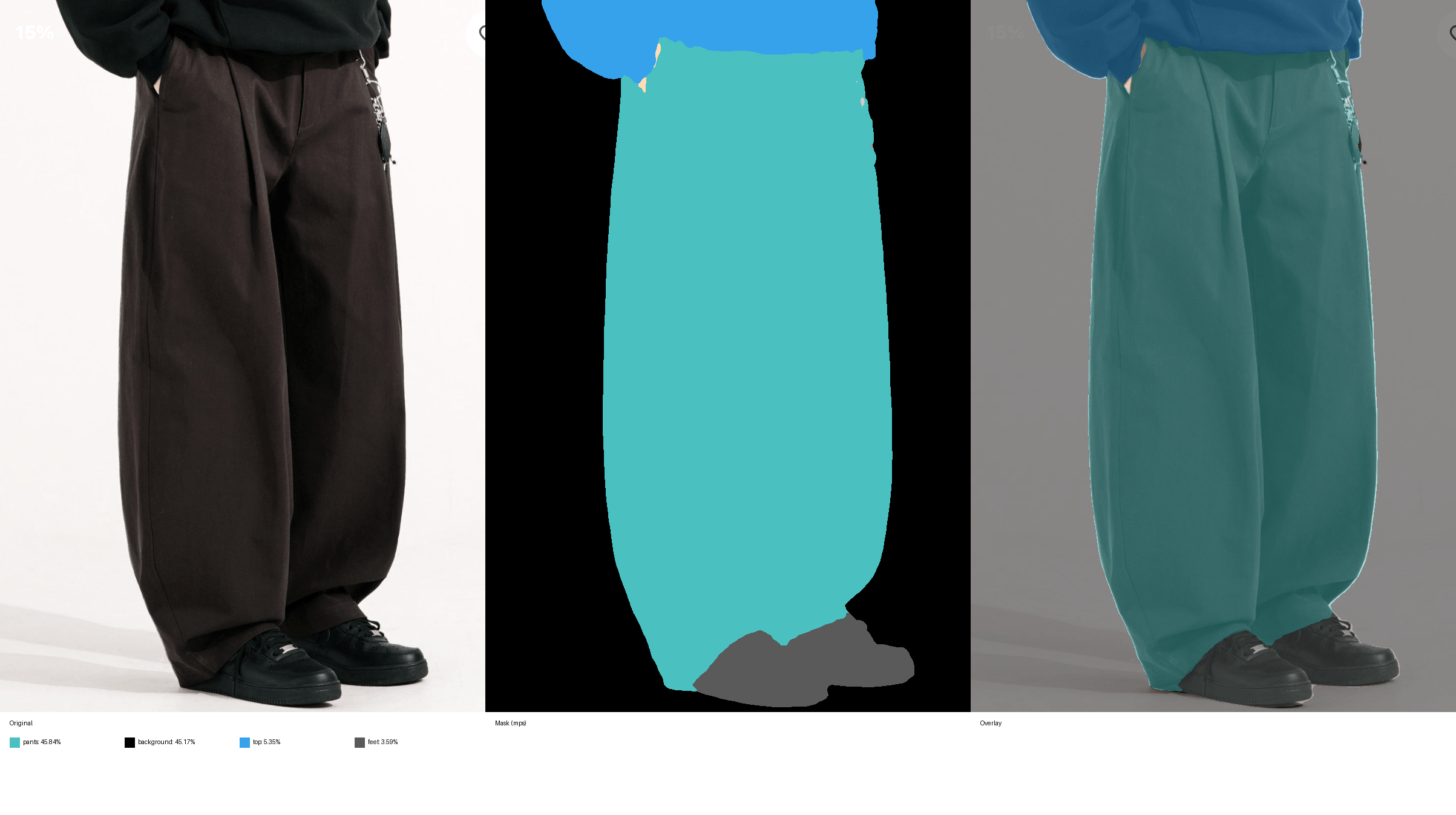
Choosing the largest class naively could select background, so the experiment selected the largest area only among garment class candidates such as top, dress, skirt, and pants. In this sample, pants was selected, and the pants silhouette was good enough for the experiment. It was not garment matting quality, though. Thin accessories like a keychain, the hand and pocket area, and the boundary around the foot and hem were still imperfect.
What I changed
In the notebook, I created two variants for the same model image.
baseline_original: pass the original garment image, including the hoodie, shoes, and body parts, directly to the providermasked_largest_garment: pass only thepantsregion selected by the human parser as a transparent PNG
Provider runtime was about 14.8 seconds for the baseline and about 25.2 seconds for the masked variant. This was a single-run result and includes external provider latency variance. Local preprocessing itself was about 0.26 seconds on warm MPS, and the segmentation step recorded in the notebook was about 0.72 seconds.
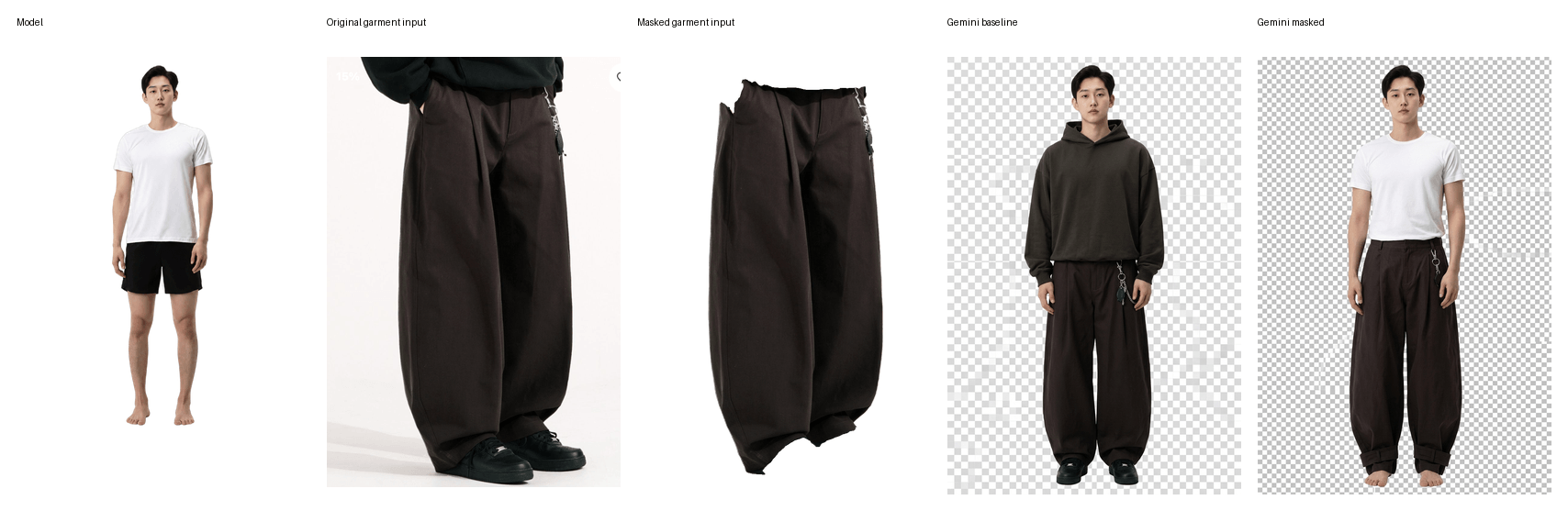
I recorded the manual evaluation below. Scores use a 1-5 scale. The table keeps only the numbers, and the judgment notes are separated below.
| Variant | Garment identity | Body realism | Edge quality | Artifact control | Overall |
|---|---|---|---|---|---|
| Original input | 2.0 | 4.0 | 4.0 | 2.0 | 2.8 |
| Masked input | 4.0 | 3.5 | 3.5 | 3.5 | 3.7 |
Evaluation notes
baseline_original: The provider interpreted the original image as ahoodie + pantsoutfit. The pants looked natural, but the expectedpants onlytarget failed.masked_largest_garment: The white T-shirt and shoes were better preserved, and the output moved toward applying only the pants. However, the foot and hem were distorted, and a checkerboard background remained.
What I learned
Masking helped in this experiment. The point was not that it automatically improved image quality. It reduced the garment scope that the provider had to interpret. Passing the original image let the provider pull surrounding outfit information into the result. Passing only the pants made the contract much clearer: apply the pants, preserve the rest.
It is still too early to make this a production default. The human parser is good enough for semantic segmentation, but it is not a pixel-level matting tool. Also, the provider returned a rasterized checkerboard background rather than true alpha, so post-processing needs to be evaluated together.
How I will judge this next time
When I see a similar virtual try-on issue, I will not immediately change providers. First, I will check whether the target garment and reference outfit are mixed inside the input image. If the user wanted pants only but shoes or a top changed as well, target garment scope should be checked before model choice.
The next step is not to attach this directly to the backend. It is to repeat the same comparison across 3-5 representative garments. If the masked variant keeps winning, I would add it as an experimental feature behind a feature flag.
The candidate flow is:
- Skip if the provider is not supported.
- Skip if
VIRTUAL_FITTING_GARMENT_MASKING_ENABLEDis off. - Run the singleton parser through
asyncio.to_threador a bounded executor. - Keep only the largest area among allowed garment classes.
- Fall back to original bytes if the garment area is too small.
- Record
garment_segmentationin the performance step. - Pass masked PNG bytes into the direct-bytes runner.
The conclusion of this experiment is that it is worth continuing. Masking was useful for controlling target garment scope, but before it becomes a production feature, it needs repeated validation across multiple inputs, including whether shoes and tops are preserved, plus a comparison with remove-background post-processing.