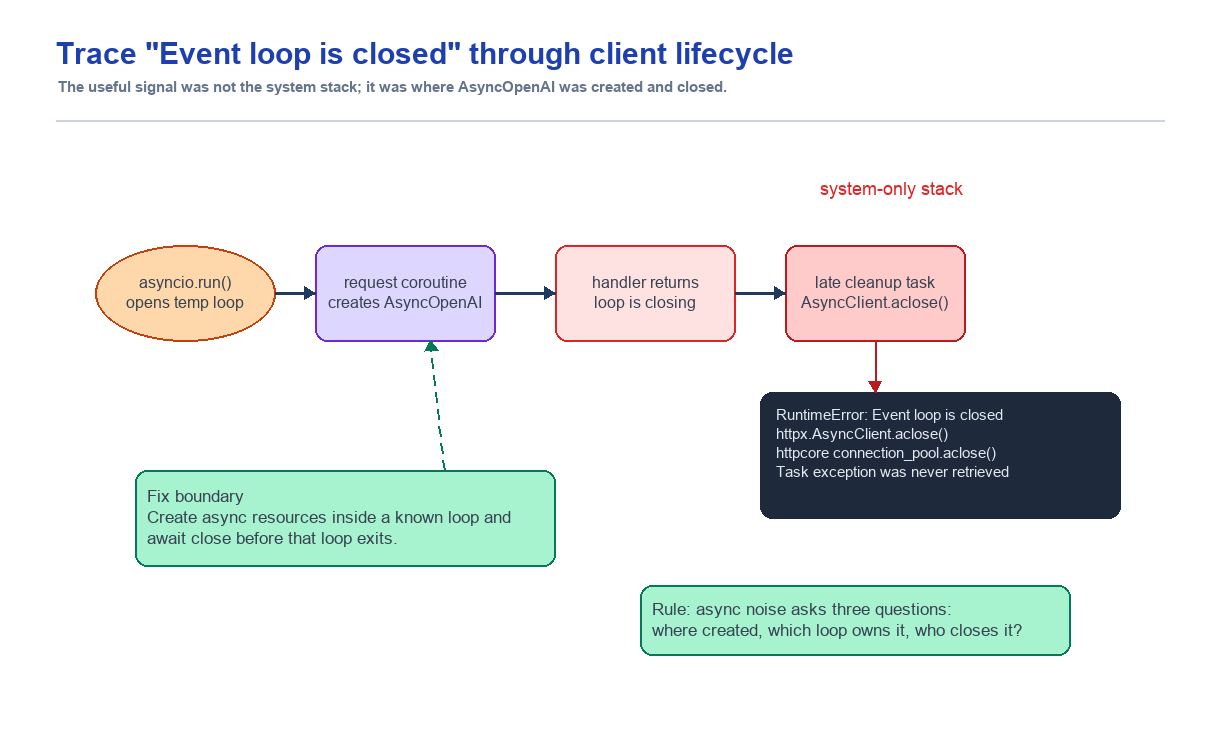
Sentry에는 우리 코드가 거의 보이지 않는 RuntimeError: Event loop is closed가 반복해서 쌓이고 있었다. 처음에는 library cleanup noise처럼 보였지만, coroutine 이름과 asyncio.run() 경계를 따라가 보니 raw AsyncOpenAI client가 생성된 event loop 안에서 닫히지 않는 lifecycle 문제였다. 해결은 큰 async 구조 개편이 아니라 client를 만든 경로에서 coroutine 반환 전에 async close를 보장하는 작은 fix였다.
요약
- 문제: Sentry에
RuntimeError: Event loop is closed가 recurring noise로 쌓이고 있었다. - 증상: 최근 24시간 5건, 전체 36건, 상태는 regressed였다.
- 판단: system-only stack을 버리지 않고, cleanup 대상 resource와 event loop lifecycle 경계를 추적했다.
- 원인:
asyncio.run()으로 열린 event loop 안에서 만든 OpenAI async client가 coroutine 종료 전에 닫히지 않았다. - 해결: raw
AsyncOpenAIclient를 만든 meta prompt와 final HTML generation 경로에서finally로 async close를 보장했다. - 배운 점: system-only stack도 버릴 정보가 아니다. "우리 코드가 안 보이는 스택"은 lifecycle 경계를 봐야 한다는 신호일 수 있다.
상황
Place2Page는 지도 URL을 받아 장소 데이터를 가져오고 AI로 랜딩페이지 HTML을 만든다. generation pipeline은 대략 이렇게 흐른다.
place URL
  -> Google/Naver place fetch
  -> meta prompt generation
  -> final freeform HTML generation
  -> landing/debug log 저장
  -> SSE로 진행상황 전달
최근에는 Sentry 이슈를 우선순위대로 보고 있었다. DB pool timeout 같은 명확한 P1은 먼저 처리했고, 그 다음으로 반복적으로 눈에 걸리는 이슈가 있었다.
RuntimeError: Event loop is closed처음 보기에는 사용자 영향이 큰 실패처럼 보이지 않았다. Sentry상 users impacted는 0이었다. 하지만 이슈 상태는 regressed였고, 최근 24시간에만 5건이 다시 발생했다. 전체 occurrence도 36건이었다.
이런 종류의 에러는 그냥 무시하기 쉽다. request handler가 직접 실패한 것도 아니고, stack도 거의 전부 library 내부였다. 하지만 production 로그에 계속 남는 noise는 운영 감도를 떨어뜨린다. 진짜 장애가 생겼을 때 신호를 흐리게 만든다.
문제
Sentry 최신 이벤트 메시지는 이랬다.
Task exception was never retrieved
future: <Task finished name='Task-117508'
  coro=<AsyncClient.aclose() done, defined at /app/.venv/lib/python3.11/site-packages/httpx/_client.py:1978>
  exception=RuntimeError('Event loop is closed')>
에러 자체는 단순했다.
RuntimeError: Event loop is closed하지만 stack은 전부 system frame이었다.
httpx/_client.py:1985 in aclose
httpx/_transports/default.py:406 in aclose
httpcore/_async/connection_pool.py:353 in aclose
httpcore/_async/http11.py:258 in aclose
anyio/streams/tls.py:241 in aclose
anyio/_backends/_asyncio.py:1352 in aclose
asyncio/selector_events.py:864 in close
asyncio/base_events.py:520 in _check_closed
우리 코드 파일이 보이지 않았다. 그래서 처음에는 "어디서 닫히는지"가 잘 안 보였다.
여기서 중요한 단서는 두 가지였다.
첫째, coroutine 이름이 AsyncClient.aclose()였다. OpenAI SDK는 내부적으로 HTTP client를 사용한다. Sentry stack에는 httpx.AsyncClient cleanup이 보였다.
둘째, 메시지가 Task exception was never retrieved였다. request handler에서 직접 raise된 exception이라기보다, 나중에 cleanup task가 실행되면서 이미 닫힌 event loop를 만난 형태에 가까웠다.
처음 생각한 가설
가설은 이렇게 잡았다.
OpenAI async client가 생성된 event loop 안에서 명시적으로 닫히지 않고, event loop가 닫힌 뒤에 httpx cleanup이 실행되고 있다.
이 가설을 보려면 event loop를 누가 만들고 닫는지 확인해야 했다.
Place2Page의 generation background path에는 sync function 안에서 async generation coroutine을 실행하는 구간이 있다.
rendered_html, generation_meta = asyncio.run(
    generate_freeform_landing_html_with_meta(...)
)
Python 공식 문서에서 asyncio.run()은 coroutine을 실행하고, async generator와 executor를 정리한 뒤, 새로 만든 event loop를 끝에서 닫는다. main entry point로 한 번 쓰는 용도에 가깝다.
그러면 이 구조에서는 generate_freeform_landing_html_with_meta() 안에서 만든 async resource가 coroutine이 끝나기 전에 닫혀야 한다.
그런데 코드 검색을 해보니 raw OpenAI async client를 만드는 경로가 있었다.
def _openai_raw_client():
    return AsyncOpenAI(...)
그리고 이 client가 쓰이는 곳은 두 군데였다.
_generate_freeform_meta_prompt_with_openai()_request_freeform_html_with_openai()
둘 다 client를 만들고 client.responses.create(...)를 호출했지만 명시적으로 닫지는 않았다.
공식 문서로 기준 잡기
감으로 "닫으면 되겠지"라고 끝내지 않으려고 공식 문서를 같이 봤다.
HTTPX의 async 문서는 AsyncClient를 async with로 context-managed 하거나 manual lifecycle을 쓸 때는 await client.aclose()로 명시적으로 닫으라고 설명한다. 특히 manual streaming mode에서는 response close를 개발자가 책임져야 한다고 경고한다.
Python asyncio.run() 문서는 이 함수가 새 event loop를 만들고 끝에서 닫는다고 설명한다. 즉, asyncio.run() 안에서 만든 async HTTP client는 그 loop가 살아 있을 때 닫아야 한다.
이번 이슈의 구조는 두 문서가 만나는 지점이었다.
HTTPX async client는 async close가 필요하다.
asyncio.run()은 끝에서 event loop를 닫는다.
따라서 asyncio.run() 안에서 만든 client는 coroutine 반환 전에 닫혀야 한다.
로컬 SDK 표면 확인
한 가지 더 확인해야 했다. Sentry stack은 httpx.AsyncClient.aclose()였지만, 우리 코드가 직접 쓰는 객체는 OpenAI SDK의 AsyncOpenAI다. 이 객체가 어떤 close API를 제공하는지 로컬에서 확인했다.
cd apps/api
uv run python - <<'PY'
from openai import AsyncOpenAI
import inspect

client = AsyncOpenAI(api_key="test-key")
print("AsyncOpenAI has close:", hasattr(client, "close"))
print("AsyncOpenAI.close is coroutine:", inspect.iscoroutinefunction(getattr(client, "close", None)))
print("AsyncOpenAI has aclose:", hasattr(client, "aclose"))
print("AsyncOpenAI.aclose is coroutine:", inspect.iscoroutinefunction(getattr(client, "aclose", None)))
print("AsyncOpenAI supports async context manager:", hasattr(client, "__aenter__") and hasattr(client, "__aexit__"))
PY
결과는 이랬다.
AsyncOpenAI has close: True
AsyncOpenAI.close is coroutine: True
AsyncOpenAI has aclose: False
AsyncOpenAI.aclose is coroutine: False
AsyncOpenAI supports async context manager: True
즉, 우리 SDK 버전에서는 AsyncOpenAI에 aclose()가 없고 async close()가 있었다. 그래서 helper는 aclose가 있으면 쓰고, 없으면 close를 찾아서 awaitable이면 await하는 형태가 맞았다.
RED 테스트
수정 전에 테스트를 먼저 추가했다.
목표는 단순했다.
- OpenAI final HTML 요청이 성공해도 raw client가 닫혀야 한다.
- OpenAI meta prompt 요청이 성공해도 raw client가 닫혀야 한다.
테스트에서는 실제 네트워크를 쓰지 않았다. 대신 responses.create()와 async close()를 가진 fake client를 만들었다.
class _ClosableOpenAIRawClient:
    def __init__(self, response: object):
        self.responses = _OpenAIResponses(response)
        self.close_calls = 0

    async def close(self) -> None:
        self.close_calls += 1
final HTML stream은 async iterator로 흉내냈다.
class _AsyncEventStream:
    def __init__(self, events: list[object]):
        self._events = iter(events)

    def __aiter__(self):
        return self

    async def __anext__(self):
        try:
            return next(self._events)
        except StopIteration as exc:
            raise StopAsyncIteration from exc
첫 번째 테스트는 final HTML 요청이 끝난 뒤 close_calls == 1인지 확인했다.
def test_request_freeform_html_with_openai_closes_raw_client(monkeypatch):
    client = _ClosableOpenAIRawClient(_AsyncEventStream([...]))

    monkeypatch.setattr(generation_service.settings, "openai_api_key", "test-key")
    monkeypatch.setattr(generation_service, "_openai_raw_client", lambda: client)

    result = asyncio.run(
        generation_service._request_freeform_html_with_openai(...)
    )

    assert result == html
    assert client.close_calls == 1
두 번째 테스트는 meta prompt 생성이 끝난 뒤 같은 조건을 확인했다.
def test_generate_freeform_meta_prompt_with_openai_closes_raw_client(monkeypatch):
    client = _ClosableOpenAIRawClient(
        SimpleNamespace(output_text="Use the venue data to choose a focused style.")
    )

    monkeypatch.setattr(generation_service.settings, "openai_api_key", "test-key")
    monkeypatch.setattr(generation_service, "_openai_raw_client", lambda: client)

    result = asyncio.run(
        generation_service._generate_freeform_meta_prompt_with_openai(...)
    )

    assert result == "Use the venue data to choose a focused style."
    assert client.close_calls == 1
수정 전 결과는 둘 다 실패였다.
assert 0 == 1이 실패가 핵심 증거였다. Sentry는 cleanup이 늦게 실행되는 모습을 보여줬고, 테스트는 우리 generation 경로가 client를 닫지 않는다는 사실을 보여줬다.
해결한 방식
수정은 작게 잡았다.
먼저 OpenAI async client close helper를 만들었다.
async def _close_openai_async_client(client: Any, *, context: str) -> None:
    close = getattr(client, "aclose", None)
    if not callable(close):
        close = getattr(client, "close", None)
    if not callable(close):
        return
    try:
        result = close()
        if inspect.isawaitable(result):
            await result
    except Exception:
        logger.warning(
            "Failed to close OpenAI async client (context=%s)",
            context,
            exc_info=True,
        )
그 다음 raw client를 만드는 두 함수에 try/finally를 붙였다.
client = _openai_raw_client()
try:
    stream = await client.responses.create(**request_payload)
    ...
    return output_text
finally:
    await _close_openai_async_client(client, context="freeform_html")
meta prompt도 같은 패턴이다.
client = _openai_raw_client()
try:
    response = await client.responses.create(**request_payload)
    ...
    return normalized
finally:
    await _close_openai_async_client(client, context="meta_prompt")
이렇게 하면 OpenAI/httpx cleanup이 asyncio.run()이 닫는 event loop 밖으로 밀리지 않는다. 요청을 만든 loop 안에서 client close까지 끝난다.
왜 더 큰 구조 변경을 하지 않았나
사실 더 큰 선택지도 있었다.
- generation background worker를 전부 async-first 구조로 바꾸기
- OpenAI client를 app lifespan singleton으로 관리하기
asyncio.run()자체를 없애고 event loop boundary를 재설계하기
장기적으로는 이런 방향이 더 깔끔할 수 있다. 하지만 이번 Sentry 이슈의 직접 원인은 per-generation raw async client가 닫히지 않는 것이었다. 당장 큰 구조 변경을 하면 DB session lifecycle 수정, SSE stream, provider fallback 같은 다른 표면까지 같이 흔들 수 있었다.
그래서 이번에는 "client를 만든 곳에서 닫는다"로 범위를 제한했다.
이 선택의 장점은 명확하다.
- production error와 직접 연결된 경로만 고친다.
- 실패해도 fallback/quality gate 흐름은 그대로 유지된다.
- 테스트가 close boundary를 직접 고정한다.
- 나중에 async worker 구조를 바꾸더라도 lifecycle 규칙은 남는다.
검증
처음 실패했던 두 테스트는 수정 후 통과했다.
cd apps/api
uv run pytest -q \
  tests/test_generation_service.py::test_request_freeform_html_with_openai_closes_raw_client \
  tests/test_generation_service.py::test_generate_freeform_meta_prompt_with_openai_closes_raw_client
2 passed in 0.30sgeneration service 전체 테스트도 돌렸다.
cd apps/api
uv run pytest -q tests/test_generation_service.py
72 passed in 0.47slint도 통과했다.
cd apps/api
uv run ruff check services/generation_service.py tests/test_generation_service.py
All checks passed!최종으로 이번 Sentry hotfix 묶음까지 같이 확인했을 때는 targeted API 테스트 185개가 통과했다.
185 passed, 1 warning in 4.44s증거 파일은 repo에 같이 남겼다.
outputs/sentry-event-loop-closed-20260522/
  README.md
  red-openai-client-close-tests.txt
  green-openai-client-close-tests.txt
  openai-async-client-surface.txt
  test-generation-service.txt
  ruff-generation-service.txt
  git-diff-check.txt
  fix.diff
배운 점
이번 이슈에서 제일 중요한 배움은 stack에 우리 코드가 없다고 해서 우리 문제가 아닌 것은 아니라는 점이었다.
Sentry stack은 httpx, httpcore, anyio, asyncio만 보여줬다. 하지만 그 stack은 "누가 client를 만들었는가"가 아니라 "늦게 닫히다 어디서 터졌는가"를 보여주는 스택이었다.
이럴 때는 stack을 아래에서 위로만 읽으면 막힌다. 대신 lifecycle 질문으로 바꿔야 한다.
- 이 async resource는 어디서 생성됐나?
- 어떤 event loop에 묶여 있나?
- 누가 닫아야 하나?
- 닫히는 시점이 loop 종료 전인가 후인가?
- cleanup task가 request context 밖에서 실행될 가능성이 있나?
이번에는 이 질문들이 asyncio.run()과 raw AsyncOpenAI client로 이어졌다.
또 하나의 배움은 SDK wrapper의 surface를 직접 확인해야 한다는 점이다. Sentry에는 httpx.AsyncClient.aclose()가 보였지만 우리가 닫아야 하는 객체는 AsyncOpenAI였다. 로컬 확인 결과 이 SDK는 async close()를 제공하고 aclose()는 없었다. 문서와 실제 설치 버전 사이의 마지막 1cm는 로컬 introspection으로 확인하는 것이 안전했다.
다음에는 이렇게 판단한다
비슷한 Event loop is closed 계열 이슈가 나오면 마지막에 터진 library frame보다 resource lifecycle을 먼저 본다. cleanup stack은 원인을 보여주기보다, 어떤 resource가 늦게 닫혔는지를 보여주는 경우가 많다.
순서는 이렇게 잡는다.
- Sentry에서 message의 coroutine 이름을 본다.
- system-only stack이라도 cleanup 대상 resource를 찾는다.
asyncio.run(), background task, thread boundary가 있는지 본다.- 해당 resource가 loop 종료 전에 명시 close되는지 테스트로 고정한다.
- singleton이나 app lifespan 전환은 direct fix 이후 별도 설계로 분리한다.
Event loop is closed는 대개 마지막에 터진다. 하지만 마지막에 터졌다고 마지막 코드가 원인은 아니다. 원인은 보통 그 resource를 만든 곳, 그리고 닫기로 약속한 곳 사이에 있다.